

If you want to develop this game, please submit your updates.
File Name : htanoid.hta
Requirement : IE 6 ?
Author : Jean-Luc Antoine
Submitted : 17/05/2002
Category : Other
效果图:
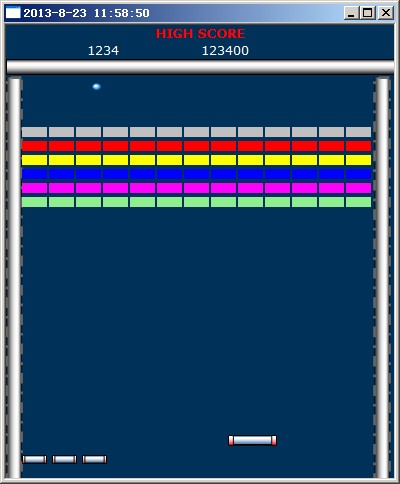
实现代码:
<HTA:APPLICATION
APPLICATIONNAME="HTAnoid"
BORDER="thick" | "dialog" | "none" | "thin"
BORDERSTYLE="normal" | "complex" | "raised" | "static" | "sunken"
CAPTION="yes" CONTEXTMENU="yes"
ID="oHTA" alert(oHTA.applicationName);
INNERBORDER="yes" MAXIMIZEBUTTON="yes" MINIMIZEBUTTON="yes"
NAVIGABLE="no" SCROLL="no" SCROLLFLAT="no"
SELECTION="yes" SHOWINTASKBAR="yes" SINGLEINSTANCE="no"
SYSMENU="yes" VERSION="0.5"
WINDOWSTATE="normal" | "maximize" | "minimize">
<script language=vbscript>
Option explicit
Const C_ScreenW=400
Const C_NbX=12
Const C_NbY=10
Dim Terrain(10,12)
Dim RaqX,RaqW,Playing,BalleX,BalleY
Dim DirBX,DirBY 'Direction balle X,Y
Dim BordDroit
BordDroit=C_ScreenW-32
Sub Document_onKeyPress()
Select Case UCase(Chr(Window.Event.keyCode))
Case "P"
Msgbox "pause"
'Window.ClearTimeOut
End Select
End Sub
Sub Document_onClick()
Playing=True
'document.title="click " & window.event.button
End Sub
Sub Document_onMouseMove()
RaqX=window.event.clientX-RaqW '.shiftKey .keyCode .ctrlKey .button .altKey
If RaqX<16 Then RaqX=16 'Mur gauche
If RaqX+RaqW>BordDroit Then RaqX=BordDroit-RaqW
Raquette.style.Left=RaqX
If Not Playing Then
BalleX=RaqX+RaqW/2
Balle.Style.Left=BalleX
End If
End Sub
Sub DrawLevel(n)
Dim k,x,y
set k=document.getElementById("Raquette")
For y=0 To C_NbY
For x=0 To C_NbX
Terrain(y,x)=0 'Nb de coups restant à porter
Next
Next
Select Case n
Case 1
'Bricks
For y=0 To 5
For x=0 To C_NbX
k.insertAdjacentHTML "beforeBegin","<TABLE style='position:absolute;top=" & 102+14*y & ";left=" & 16+27*x _
& ";width=25;height=10;' bgcolor=" & Array("silver","red","yellow","blue","magenta","lightgreen")(y) & "><TR><TD></TD></TR></TABLE>"
Next
Next
End Select
Randomize
BalleY=400
DirBX=Int(Rnd()*3)+1
DirBY=0-(Int(Rnd()*4)+1)
End Sub
Sub Init
Dim x,y,k
Window.MoveTo screen.Width/2-200,0
Window.ReSizeTo C_ScreenW,484
RaqW=Int(Replace(Raquette.style.width,"pc","")*1.6)
'Lives Left
set k=document.getElementById("Raquette")
'CreateElement + insertAdjacentElement
For x=0 To 2
k.insertAdjacentHTML "beforeBegin","<v:group style='position:absolute;top=430;left=" & 16+x*30 _
& ";width:15pc;height:5pc;'><v:roundrect style='width:100;height:100;' fillcolor=red><v:fill type='gradient'/></v:roundrect>" _
& "<v:rect style='position:relative;left:10;top:2;width:80;height:90' strokecolor=black><v:fill type='gradient' color=#4682b4 focus=0.2 /></v:rect></v:group>"
Next
DrawLevel 1
Playing=False
window.setTimeout "Gere",10
End Sub
Sub Gere
If Playing Then
'Déplacement de la balle
If DirBX>0 Then
If BalleX+DirBX>BordDroit-10 Then DirBX=0-DirBx
Else
If BalleX+DirBX<16 Then DirBX=0-DirBx
End If
If DirBY>0 Then
If BalleY+DirBY>400 Then DirBY=0-DirBY
Else
If BalleY+DirBY<50 Then DirBY=0-DirBY
End If
BalleX=BalleX+DirBX
BalleY=BalleY+DirBY
Balle.Style.Left=BalleX
Balle.Style.Top=BalleY
Else
document.title=Now
End If
window.setTimeout "Gere",10
End Sub
</script>
<STYLE TYPE="text/css">
<!--
v\:* {behavior:url(#default#VML);}
t\:* {behavior:url(#default#time2)}
BODY {
font-family: "Verdana, Arial, Helvetica, sans-serif";
background-color=#003159;
color:#0000FF;
font-size: 8pt;
}
TABLE,TD {
border:'0pix groove';
cursor:W-resize;
}
.score {
color:white;
font-size: 10pt;
}
-->
</STYLE>
</head>
<body topmargin=0 leftmargin=0 rightmargin=0 onload="vbscript:init">
<!-- Panel de score -->
<CENTER><font size=2 color=red><b>HIGH SCORE</b></font><br><table cellspacing=0 width=100%><tr><td width=50% align=center>
<div id=Score class=score>1234</div></td><td><div id=HighScore class=score>123400</div></td></tr></table></CENTER>
<!-- terrain -->
<table width=100% height=420 cellspacing=0 cellpadding=0>
<tr height=14><td colspan=3>
<v:rect style='width:100%;height:15'>
<v:fill type="gradient" color=white color2=darkgray focus=3.3 />
</v:rect>
</td></tr>
<tr height=100%><td width=15>
<v:rect style='width:15;height:100%' strokecolor="#666666" strokeweight="2pt">
<v:stroke dashstyle="dashdot" />
<v:fill type="gradient" angle="-90" color2=white color=darkgray focus=3.3 />
</v:rect>
</td>
<td width=100%>
<v:oval id="balle" style='position:absolute;top=400;width:8;height:6' fillcolor=#009999 strokecolor=#0066FF id=boule>
<v:fill type=gradientradial color2=white focusposition=0.3,0.3 focussize=0.01,0.01 />
</v:oval>
<v:group id=Raquette style='position:absolute;top=410;width:30pc;height:6pc;'>
<v:roundrect style='width:100;height:100;' fillcolor=red>
<v:fill type='gradient'/></v:roundrect>
<v:rect style='position:relative;left:10;top:2;width:80;height:90' strokecolor=black>
<v:fill type='gradient' color=#4682b4 focus=0.2 /></v:rect>
</v:group>
</td>
<td align=right>
<v:rect style='width:15;height:100%' strokecolor="#666666" strokeweight="2pt">
<v:stroke dashstyle="dashdot" />
<v:fill type="gradient" angle="-90" color2=white color=darkgray focus=3.3 />
</v:rect>
</td></tr>
</table>
</body>
</html>
</div>
原文:http://www.interclasse.com/scripts/htanoid.php