
• linkedu视频
  • 平面设计
  • 电脑入门
  • 操作系统
  • 办公应用
  • 电脑硬件
  • 动画设计
  • 3D设计
  • 网页设计
  • CAD设计
  • 影音处理
  • 数据库
  • 程序设计
  • 认证考试
  • 信息管理
  • 信息安全
菜单
linkedu.com
  • 网页制作
  • 数据库
  • 程序设计
  • 操作系统
  • CMS教程
  • 游戏攻略
  • 脚本语言
  • 平面设计
  • 软件教程
  • 网络安全
  • 电脑知识
  • 服务器
  • 视频教程
  • vbs
  • DOS/BAT
  • hta/htc
  • python
  • perl
  • VBA
  • ColdFusion
  • ruby
  • PowerShell
  • Lua
  • Golang
  • linux shell
您的位置:首页 > 脚本语言 >PowerShell > PowerShell小技巧之读取Windows产品密钥

PowerShell小技巧之读取Windows产品密钥

作者:hebedich 字体:[增加 减小] 来源:互联网

hebedich 通过本文主要向大家介绍了windows powershell,windows10 powershell,windows7 powershell,windowspowershell2.0,windows powershell64等相关知识,希望对您有所帮助,也希望大家支持linkedu.com www.linkedu.com

之前大多数人可能用过VBS读取Windows产品密钥的VBS脚本,VBS脚本通常都比较隐晦、难懂,今天忙里偷闲,随手写了一个用于读取Windows产品密钥的PowerShell脚本。

代码如下:

 =====文件名:Get-WindowsProductKey.ps1=====
function Get-WindowsProductKey([string]$computer)
{

$comments =@'
author:fuhj(powershell#live.cn ,http://fuhaijun.com)
example: Get-WindowsProductKey .
'@
$reg = [WMIClass] ("\\" + $computer + "\root\default:StdRegProv")
$values = [byte[]]($reg.getbinaryvalue(2147483650,"SOFTWARE\Microsoft\Windows NT\CurrentVersion","DigitalProductId").uvalue)
$lookup = [char[]]("B","C","D","F","G","H","J","K","M","P","Q","R","T","V","W","X","Y","2","3","4","6","7","8","9")
$keyStartIndex = [int]52;
$keyEndIndex = [int]($keyStartIndex + 15);
$decodeLength = [int]29
$decodeStringLength = [int]15
$decodedChars = new-object char[] $decodeLength
$hexPid = new-object System.Collections.ArrayList
for ($i = $keyStartIndex; $i -le $keyEndIndex; $i++){ [void]$hexPid.Add($values[$i]) }
for ( $i = $decodeLength - 1; $i -ge 0; $i--)
    {
     if (($i + 1) % 6 -eq 0){$decodedChars[$i] = '-'}
     else
       {
        $digitMapIndex = [int]0
        for ($j = $decodeStringLength - 1; $j -ge 0; $j--)
        {
            $byteValue = [int](($digitMapIndex * [int]256) -bor [byte]$hexPid[$j]);
            $hexPid[$j] = [byte] ([math]::Floor($byteValue / 24));
            $digitMapIndex = $byteValue % 24;
            $decodedChars[$i] = $lookup[$digitMapIndex];
         }
        }
     }
$STR = ''
$decodedChars | % { $str+=$_}
$STR
}

Get-WindowsProductKey .
</div>

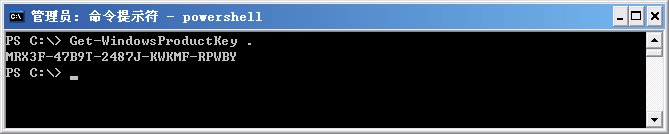
执行效果如下:
</div>

您可能想查找下面的文章:

  • PowerShell使用match操作符来筛选数组
  • PowerShell连接SQL SERVER数据库进行操作的实现代码
  • powershell远程管理服务器磁盘空间的实现代码
  • Powershell 查询 Windows 日志的方法
  • Powershell 查找用户的主SMTP地址
  • Powershell 获取特定的网页信息的代码
  • Powershell错误处理之what-if
  • PowerShell 4.0实现自动化设置服务器
  • 揭秘PowerShell 5.0新特性和新功能
  • 简单谈谈PowerShell 4.0中的新命令

相关文章

  • PowerShell默认参数$PSDefaultParameterValues结合Out-File输出到日志文件
  • PowerShell使用枚举变量定义带智能提示功能的函数参数
  • PowerShell中字符串分行显示的两种方法技巧
  • PowerShell时间记录脚本
  • PowerShell小技巧之使用Verb打开程序
  • PowerShell中使用通配符匹配文件路径的例子
  • PowerShell函数参数用星号隐藏的方法
  • PowerShell实现查询打开某个文件的默认应用程序
  • Windows Powershell方法(对象能做什么)
  • PowerShell函数参数设置成自动识别数据类型的例子

文章分类

  • vbs
  • DOS/BAT
  • hta/htc
  • python
  • perl
  • VBA
  • ColdFusion
  • ruby
  • PowerShell
  • Lua
  • Golang
  • linux shell

最近更新的内容

    • Windows Powershell 自动化变量
    • PowerShell 4.0实现自动化设置服务器
    • Windows Powershell ForEach-Object 循环
    • 类似rpm包管理器的Windows Installer PowerShell Module简介
    • PowerShell中调用.NET对象的静态方法、静态属性和类方法、类属性例子
    • PowerShell创建Byte数组例子
    • 浅谈CMD和win powershell的区别
    • PowerShell连接SQL SERVER数据库进行操作的实现代码
    • Powershell读取PFX证书并输入密码的脚本分享
    • 使用PowerShell获取当前主机内存使用量和总量的方法

关于我们 - 联系我们 - 免责声明 - 网站地图

©2020-2025 All Rights Reserved. linkedu.com 版权所有