

shichen2014 通过本文主要向大家介绍了python tkinter,python tkinter教程,python tkinter安装,python tkinter下载,python tkinter text等相关知识,希望对您有所帮助,也希望大家支持linkedu.com www.linkedu.com
本文实例展示了Python Tkinter基础控件的用法,分享给大家供大家参考之用。具体方法如下:
# -*- coding: utf-8 -*-
from Tkinter import *

def btn_click():
  b2['text'] = 'clicked'
  evalue = e.get()
  print 'btn Click and Entry value is %s' % evalue

def btn_click_bind(event):
  print 'enter b2'

def show_toplevel():
  top = Toplevel()
  top.title('2号窗口')
  Label(top, text='这是2号窗口').pack()

root = Tk()
root.title('1号窗口')
# 显示内置图片
# x = Label(root, bitmap='warning')
l = Label(root, fg='red', bg='blue',text='wangwei', width=34, height=10)
l.pack()

# command 指定按钮调用的函数
b = Button(root, text='clickme', command=btn_click)
b['width'] = 10
b['height'] = 2
b.pack()
# 使用bind 方式关联按钮和函数
b2 = Button(root, text = 'clickme2')
b2.configure(width = 10, height = 2, state = 'disabled')
b2.bind("<Enter>", btn_click_bind)
b2.pack()
# 弹出Toplevel窗口
b3 = Button(root, text = 'showToplevel', command=show_toplevel)
b3.pack()

# 输入框
e = Entry(root, text = 'input your name')
e.pack()
# 密码框
epwd = Entry(root, text = 'input your pwd', show = '*')
epwd.pack()

# 菜单
def menu_click():
  print 'I am menu'

xmenu = Menu(root)
submenu = Menu(xmenu, tearoff = 0)
for item in ['java', 'cpp', 'c', 'php']:
  xmenu.add_command(label = item, command = menu_click)

for item in ['think in java', 'java web', 'android']:
  submenu.add_command(label = item, command = menu_click)
xmenu.add_cascade(label = 'progame', menu = submenu)

# 弹出菜单
def pop(event):
  submenu.post(event.x_root, event.y_root)

# 获取鼠标左键点击的坐标
def get_clickpoint(event):
  print event.x, event.y

# frame
for x in ['red', 'blue', 'yellow']:
  Frame(height = 20, width = 20, bg = x).pack()

root['menu'] = xmenu
root.bind('<Button-3>', pop)
root.bind('<Button-1>', get_clickpoint)
root.mainloop()
</div>
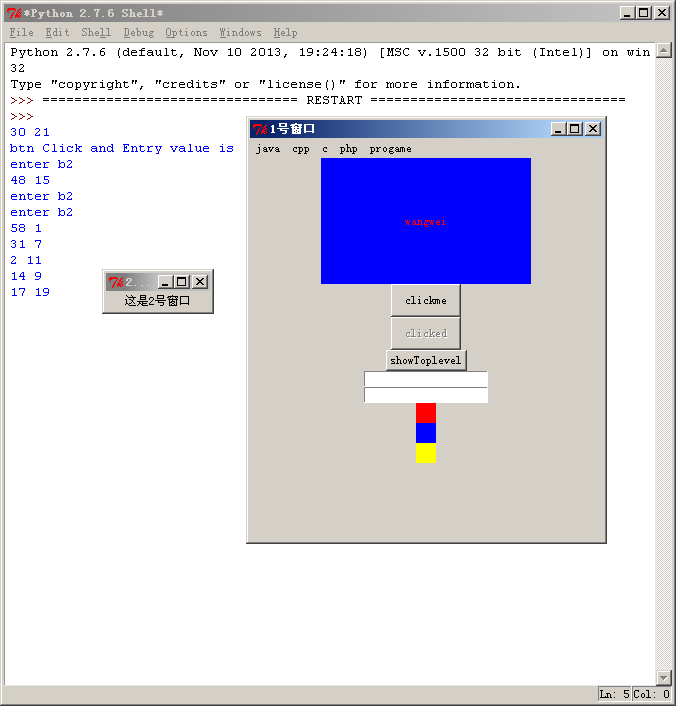
运行效果如下图所示:
希望本文所述对大家的Python程序设计有所帮助。
</div>