

NFS 是Network File System的缩写,即网络文件系统,一种使用于分散式文件系统的协定
NFS通过网络让不同的机器、不同的操作系统能够彼此分享个别的数据,例如将/home设置为共享目录,然后共享给网络中的其它服务器,这样每台机器就不必单独建立自己的/home路径了,NFS独立于操作系统,容许不同硬件及操作系统的系统共同进行文件的分享,是在类Unix系统间实现磁盘文件共享的一种方法
NFS本身没有提供信息传输的协议和功能,而是使用RPC服务完成这部分功能。可以说NFS本身就是使用RPC服务的一个程序,或者说NFS也是一个RPC SERVER。所以只要用到NFS的地方都要启动RPC服务,不论是NFS server还是NFS client,可以这么理解RPC和NFS之间的关系:NFS是一个文件系统,而RPC负责信息的传输
一,系统环境
Linux Distribution:Ubuntu 14
二,安装Linux NFS
sean@sean:~$ sudo apt-get install nfs-kernel-server
[sudo] password for sean:
Reading package lists... Done
Building dependency tree
Reading state information... Done
The following extra packages will be installed:
 keyutils libgssglue1 libnfsidmap2 libtirpc1 nfs-common rpcbind
Suggested packages:
 open-iscsi watchdog
The following NEW packages will be installed:
 keyutils libgssglue1 libnfsidmap2 libtirpc1 nfs-common nfs-kernel-server
 rpcbind
0 upgraded, 7 newly installed, 0 to remove and 159 not upgraded.
Need to get 460 kB of archives.
After this operation, 2,049 kB of additional disk space will be used.
Do you want to continue? [Y/n] Y
Get:1 http://cn.archive.ubuntu.com/ubuntu/ trusty/main libgssglue1 amd64 0.4-2ubuntu1 [19.7 kB]
Get:2 http://cn.archive.ubuntu.com/ubuntu/ trusty/main libnfsidmap2 amd64 0.25-5 [32.2 kB]
Get:3 http://cn.archive.ubuntu.com/ubuntu/ trusty/main libtirpc1 amd64 0.2.2-5ubuntu2 [71.3 kB]
Get:4 http://cn.archive.ubuntu.com/ubuntu/ trusty/main keyutils amd64 1.5.6-1 [33.6 kB]
Get:5 http://cn.archive.ubuntu.com/ubuntu/ trusty-updates/main rpcbind amd64 0.2.1-2ubuntu2.2 [37.1 kB]
Get:6 http://cn.archive.ubuntu.com/ubuntu/ trusty-updates/main nfs-common amd64 1:1.2.8-6ubuntu1.2 [181 kB]
Get:7 http://cn.archive.ubuntu.com/ubuntu/ trusty-updates/main nfs-kernel-server amd64 1:1.2.8-6ubuntu1.2 [85.8 kB]
Fetched 460 kB in 16s (27.2 kB/s)
Selecting previously unselected package libgssglue1:amd64.
(Reading database ... 168701 files and directories currently installed.)
Preparing to unpack .../libgssglue1_0.4-2ubuntu1_amd64.deb ...
Unpacking libgssglue1:amd64 (0.4-2ubuntu1) ...
Selecting previously unselected package libnfsidmap2:amd64.
Preparing to unpack .../libnfsidmap2_0.25-5_amd64.deb ...
Unpacking libnfsidmap2:amd64 (0.25-5) ...
Selecting previously unselected package libtirpc1:amd64.
Preparing to unpack .../libtirpc1_0.2.2-5ubuntu2_amd64.deb ...
Unpacking libtirpc1:amd64 (0.2.2-5ubuntu2) ...
Selecting previously unselected package keyutils.
Preparing to unpack .../keyutils_1.5.6-1_amd64.deb ...
Unpacking keyutils (1.5.6-1) ...
Selecting previously unselected package rpcbind.
Preparing to unpack .../rpcbind_0.2.1-2ubuntu2.2_amd64.deb ...
Unpacking rpcbind (0.2.1-2ubuntu2.2) ...
Selecting previously unselected package nfs-common.
Preparing to unpack .../nfs-common_1%3a1.2.8-6ubuntu1.2_amd64.deb ...
Unpacking nfs-common (1:1.2.8-6ubuntu1.2) ...
Selecting previously unselected package nfs-kernel-server.
Preparing to unpack .../nfs-kernel-server_1%3a1.2.8-6ubuntu1.2_amd64.deb ...
Unpacking nfs-kernel-server (1:1.2.8-6ubuntu1.2) ...
Processing triggers for man-db (2.6.7.1-1ubuntu1) ...
Processing triggers for ureadahead (0.100.0-16) ...
ureadahead will be reprofiled on next reboot
Setting up libgssglue1:amd64 (0.4-2ubuntu1) ...
Setting up libnfsidmap2:amd64 (0.25-5) ...
Setting up libtirpc1:amd64 (0.2.2-5ubuntu2) ...
Setting up keyutils (1.5.6-1) ...
Setting up rpcbind (0.2.1-2ubuntu2.2) ...
 Removing any system startup links for /etc/init.d/rpcbind ...
rpcbind start/running, process 12074
Processing triggers for ureadahead (0.100.0-16) ...
Setting up nfs-common (1:1.2.8-6ubuntu1.2) ...

Creating config file /etc/idmapd.conf with new version

Creating config file /etc/default/nfs-common with new version
Adding system user `statd' (UID 118) ...
Adding new user `statd' (UID 118) with group `nogroup' ...
Not creating home directory `/var/lib/nfs'.
statd start/running, process 12307
gssd stop/pre-start, process 12341
idmapd start/running, process 12399
Processing triggers for ureadahead (0.100.0-16) ...
Setting up nfs-kernel-server (1:1.2.8-6ubuntu1.2) ...

Creating config file /etc/exports with new version

Creating config file /etc/default/nfs-kernel-server with new version
 * Not starting NFS kernel daemon: no exports.
Processing triggers for libc-bin (2.19-0ubuntu6.7) ...
Processing triggers for ureadahead (0.100.0-16) ...
</div>
通过安装日志可以发现总共会安装keyutils,libgssglue1,libnfsidmap2,libtirpc1,nfs-common,nfs-kernel-server,rpcbind这7个包
很多文档中安装的包为portmap,但是这个包已经被rpcbind替代
sean@sean:~$ sudo apt-get install portmap
Reading package lists... Done
Building dependency tree
Reading state information... Done
Note, selecting 'rpcbind' instead of 'portmap'
rpcbind is already the newest version.
0 upgraded, 0 newly installed, 0 to remove and 164 not upgraded.
rpcbind包安装完成后会自动启动rpcbind服务
sean@sean:~$ ps -ef|grep rpcbind
root 807 1 0 22:27 ? 00:00:00 rpcbind
sean 10215 9528 0 22:48 pts/6 00:00:00 grep --color=auto rpcbind
但是由于目前NFS的配置文件为空,NFS服务并没有启动
三,配置NFS服务
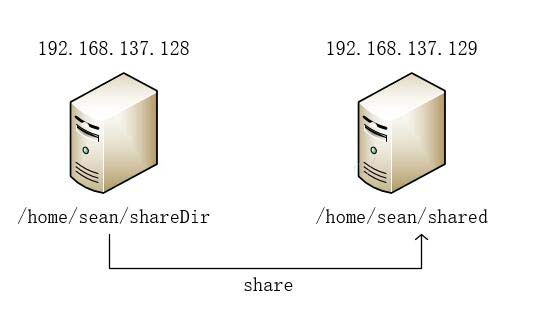
从安装日志中我们可以发现NFS服务的配置文件为/etc/exports,并且这个文件在安装过程中已经生成好了,我们所要做的就是将NFS配置信息添加到这个文件中
sean@sean:~$ sudo vi /etc/exports
# /etc/exports: the access control list for filesystems which may be exported
#        to NFS clients. See exports(5).
#
# Example for NFSv2 and NFSv3:
# /srv/homes    hostname1(rw,sync,no_subtree_check) hostname2(ro,sync,no_subtree_check)
#
# Example for NFSv4:
# /srv/nfs4    gss/krb5i(rw,sync,fsid=0,crossmnt,no_subtree_check)
# /srv/nfs4/homes gss/krb5i(rw,sync,no_subtree_check)
/home/sean/shareDir 192.168.137.129(rw,no_root_squash,async)
</div>
其中中的最后一行为新添加的NFS配置,NFS配置信息格式如下:
<共享目录> [客户端1 选项(访问权限,用户映射,其他)] [客户端2 选项(访问权限,用户映射,其他)]
1,共享目录:
共享目录是指NFS系统中需要共享给客户机使用的目录
2,客户端:
客户端是指网络中可以访问NFS共享目录的计算机
客户端常用的指定方式:
(1)指定ip地址的主机:192.168.0.1
(2)指定子网中的所有主机:192.168.0.0/255.255.255.0
(3)指定域名的主机:www.sean.com
(4)指定域中的所有主机:*.sean.com
(5)所有主机:*
3,选项:
选项用来设置输出目录的访问权限、用户映射等,NFS主要有3类选项:
访问权限选项:
(1)设置输出目录只读:ro
(2)设置输出目录读写:rw
用户映射选项:
(1)all_squash:将远程访问的所有普通用户及所属组都映射为匿名用户或用户组(nfsnobody)
(2)no_all_squash:与all_squash取反(默认设置)
(3)root_squash:将root用户及所属组都映射为匿名用户或用户组(默认设置)
(4)no_root_squash:与rootsquash取反
(5)anonuid=xxx:将远程访问的所有用户都映射为匿名用户,并指定该用户为本地用户(UID=xxx)
(6)anongid=xxx:将远程访问的所有用户组都映