

看了前面一节:linux shell数据重定向(输入重定向与输出重定向)详细分析 估计还有一些朋友是头晕晕的,好复杂的重定向了。这次我们看下管道命令了。shell管道,可以说用法就简单多了。
管道命令操作符是:”|”,它仅能处理经由前面一个指令传出的正确输出信息,也就是 standard output 的信息,对于 stdandard
error 信息没有直接处理能力。然后,传递给下一个命令,作为标准的输入 standard input.
管道命令使用说明:
先看下下面图:
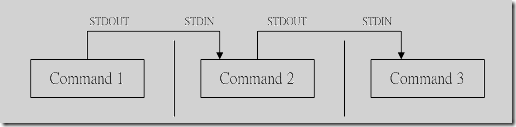
command1正确输出,作为command2的输入 然后comand2的输出作为,comand3的输入 ,comand3输出就会直接显示在屏幕上面了。
通过管道之后:comand1,comand2的正确输出不显示在屏幕上面
注意:
1、管道命令只处理前一个命令正确输出,不处理错误输出
2、管道命令右边命令,必须能够接收标准输入流命令才行。
实例:
[chengmo@centos5 shell]$ cat test.sh | grep -n 'echo'
5:    echo "very good!";
7:    echo "good!";
9:    echo "pass!";
11:    echo "no pass!";
#读出test.sh文件内容,通过管道转发给grep 作为输入内容

[chengmo@centos5 shell]$ cat test.sh test1.sh | grep -n 'echo'
cat: test1.sh: 没有那个文件或目录
5:    echo "very good!";
7:    echo "good!";
9:    echo "pass!";
11:    echo "no pass!";
#cat test1.sh不存在,错误输出打印到屏幕,正确输出通过管道发送给grep


[chengmo@centos5 shell]$ cat test.sh test1.sh 2>/dev/null | grep -n 'echo'
5:    echo "very good!";
7:    echo "good!";
9:    echo "pass!";
11:    echo "no pass!";
#将test1.sh 没有找到错误输出重定向输出给/dev/null 文件,正确输出通过管道发送给grep


[chengmo@centos5 shell]$ cat test.sh | ls
catfile      httprequest.txt  secure  test            testfdread.sh  testpipe.sh    testsh.sh      testwhile2.sh
envcron.txt  python           sh      testcase.sh     testfor2.sh    testselect.sh  test.txt       text.txt
env.txt      release          sms     testcronenv.sh  testfor.sh     test.sh        testwhile1.sh
#读取test.sh内容,通过管道发送给ls命令,由于ls 不支持标准输入,因此数据被丢弃
</div>
这里实例就是对上面2点注意的验证。作用接收标准输入的命令才可以用作管道右边。否则传递过程中数据会抛弃。 常用来作为接收数据管道命令有:sed,awk,cut,head,top,less,more,wc,join,sort,split 等等,都是些文本处理命令。
管道命令与重定向区别
区别是:
1、左边的命令应该有标准输出 | 右边的命令应该接受标准输入
左边的命令应该有标准输出 > 右边只能是文件
左边的命令应该需要标准输入 < 右边只能是文件
2、管道触发两个子进程执行"|"两边的程序;而重定向是在一个进程内执行
这些都是网上总结很多的,其实只要多加清楚用法,也一定有自己的一份不同描述。
实例:
#可以相互转换情况
#输入重定向

[chengmo@centos5 shell]$ cat test.sh| grep -n 'echo'
5:    echo "very good!";
7:    echo "good!";
9:    echo "pass!";
11:    echo "no pass!";
#"|"管道两边都必须是shell命令


[chengmo@centos5 shell]$ grep -n 'echo' <test.sh
5:    echo "very good!";
7:    echo "good!";
9:    echo "pass!";
11:    echo "no pass!";
#"重定向"符号,右边只能是文件(普通文件,文件描述符,文件设备)


[chengmo@centos5 shell]$ mail -s 'test' 8292669@qq.com <test.sh
[chengmo@centos5 shell]$ cat test.sh|mail -s 'test' 8292669@qq.com
#以上2个也相同,将test.sh内容发送到指定邮箱。


[chengmo@centos5 shell]$ (sed -n '1,$p'|grep -n 'echo')<test.sh
5:    echo "very good!";
7:    echo "good!";
9:    echo "pass!";
11:    echo "no pass!";
#这个脚本比较有意思了。由于前面是管道,后面需要把test.sh内容重定向到 sed ,然后sed输出通过管道,输入给grep.需要将前面用"()"运算符括起来。在单括号内的命令,可以把它们看作一个象一个命令样。如果不加括号test.sh就是grep 的输入了。


#上面一个等同于这个
[chengmo@centos5 shell]$ sed -n '1,$p'<test.sh | grep -n 'echo'
5:    echo "very good!";
7:    echo "good!";
9:    echo "pass!";
11:    echo "no pass!";

#重定向运算符,在shell命令解析前,首先检查的(一个命令,执行前一定检查好它的输入,输出,也就是0,1,2 设备是否准备好),所以优先级会最高


[chengmo@centos5 shell]$ sed -n '1,10p'<test.sh | grep -n 'echo' <testsh.sh
10:echo $total;
18:echo $total;
21:     echo "ok";
#哈哈,这个grep又接受管道输入,又有testsh.sh输入,那是不是2个都接收呢。刚才说了"<"运算符会优先,管道还没有发送数据前,grep绑定了testsh.sh输入,这样sed命令输出就被抛弃了。这里一定要小心使用

#输出重定向

[chengmo@centos5 shell]$ cat test.sh>test.txt
[chengmo@centos5 shell] cat test.sh|tee test.txt &>/dev/null
#通过管道实现将结果存入文件,还需要借助命令tee,它会把管道过来标准输入写入文件test.txt ,然后将标准输入复制到标准输出(stdout),所以重定向到/dev/null 不显示输出
#">"输出重定向,往往在命令最右边,接收左边命令的,输出结果,重定向到指定文件。也可以用到命令中间。


[chengmo@centos5 shell]$ ls test.sh test1.sh testsh.sh 2>err.txt | grep 'test'
test.sh
testsh.sh
#目录下面有:test,testsh文件,test1.sh不存在,因此将ls 命令错误输出输入到err.txt 正确输出,还会通过管道发送到grep命令。
[chengmo@centos5 shell]$ ls test.sh test1.sh testsh.sh &>err.txt | grep 'test'
#这次打印结果是空,&代表正确与错误输出 都输入给err.txt,通过管道继续往下面传递数据为空,所以没有什么显示的

#同样">"输出重定向符,优先级也是先解析,当一个命令有这个字符,它就会与左边命令标准输出绑定。准备好了这些,就等待命令执行输出数据,它就开始接收
</div>
再概括下:
从上面例子可以看,重定向与管道在使用时候很多时候可以通用,其实,在shell里面,经常是【条条大路通罗马】的。一般如果是命令间传递参数,还是管道的好,如果处理输出结果需要重定向到文件,还是用重定向输出比较好。
命令执行顺序可以看下:Linux Shell 通配符、元字符、转义符使用实例介绍
shell脚本接收管道输入
有意思的问题:
既然作用管道接收命令,需要可以接收标准的输入,那么我们shell脚本是否可以开发出这样的基本程序呢?(大家经常看到的,都是一些系统的命令作为管道接收方)
实例(testpipe.sh):
#!/bin/sh

 if [ $# -gt 0 ];then
     exec 0<$1;
#判断是否传入参数:文件名,如果传入,将该文件绑定到标准输入
 fi

 while read line
 do
     echo $line;
 done<&0;
#通过标准输入循环读取内容
 exec 0&-;
#解除标准输入绑定
</div>
运行结果:
[chengmo@centos5 shell]$ cat testpipe.txt 1,t,est pipe 2,t,est pipe 3,t,est pipe 4,t,est pipe #testpipe.txt 只是需要读取的测试文本 [chengmo@centos5 shell]$ cat testpipe.txt | sh testpipe.sh 1,t,est pipe 2,t,est pipe 3,t,est pipe 4,t,est pipe #通过cat 读取 testpipe.txt 发送给testpipe.sh 标准输入 [chengmo@centos5 shell]$ sh testpipe.sh testpipe.txt