

junjie 通过本文主要向大家介绍了powershell 编程实例,powershell窗口,powershell,windows powershell,powershell是什么等相关知识,希望对您有所帮助,也希望大家支持linkedu.com www.linkedu.com
怎样在PowerShell中调用WPF,你知道,我也知道;怎样在PowerShell中将很长的.NET类型名称缩短成别名,你知道,我也知道。但是怎样将这两个知识点融汇贯通,写出一个优雅的DEMO,并且让你一眼就能看出,这就是WPF,不是别的,也许你以前就知道,而我直到今天才知道,有种相见恨晚的感觉。
先看一下炫酷的效果吧!
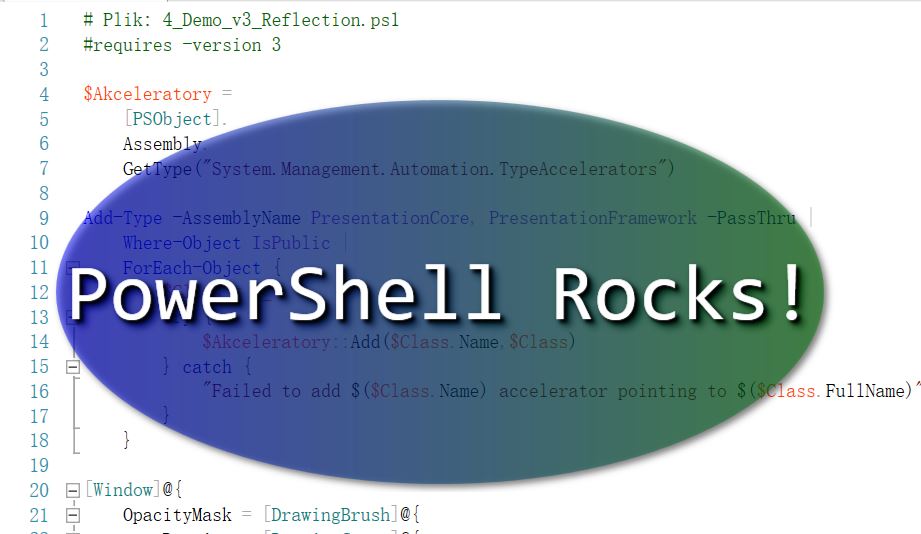
PowerShell之WPF炫酷
# Plik: 4_Demo_v3_Reflection.ps1
#requires -version 3

$Akceleratory =
  [PSObject].
  Assembly.
  GetType("System.Management.Automation.TypeAccelerators")

Add-Type -AssemblyName PresentationCore, PresentationFramework -PassThru |
  Where-Object IsPublic |
  ForEach-Object {
    $Class = $_
    try {
      $Akceleratory::Add($Class.Name,$Class)
    } catch {
      "Failed to add $($Class.Name) accelerator pointing to $($Class.FullName)"
    }
  }

[Window]@{
  OpacityMask = [DrawingBrush]@{
    Drawing = [DrawingGroup]@{
      Children = & {
        $Kolekcja = New-Object DrawingCollection
        $Kolekcja.Add([GeometryDrawing]@{
          Brush = 'Black'
          Geometry = [EllipseGeometry]@{
            radiusX = 0.48
            radiusY = 0.48
            Center = '0.5,0.5'
          }
        })
        $Kolekcja.Add([GeometryDrawing]@{
          Brush = 'Transparent'
          Geometry = [RectangleGeometry]@{
            Rect = '0,0,1,1'
          }
        })
        , $Kolekcja
      }
    }
  }
  Background = [LinearGradientBrush]@{
    Opacity = 0.5
    StartPoint = '0,0.5'
    Endpoint = '1,0.5'
    GradientStops = & {
      $Stopki = New-Object GradientStopCollection
      $Colors = 'Blue', 'Green'
        foreach ($i in 0..1) {
        $Stopki.Add(
          [GradientStop]@{
            Color = $Colors[$i]
            Offset = $i
          }
        )
      }
      , $Stopki
    }
  }
  Width = 800
  Height = 400
  WindowStyle = 'None'
  AllowsTransparency = $true
  Effect = [DropShadowEffect]@{
    BlurRadius = 10
  }
  TopMost = $true
  Content = & {
    $Stos = [StackPanel]@{
      VerticalAlignment = 'Center'
      HorizontalAlignment = 'Center'
    }

    $Stos.AddChild(
      [Label]@{
        Content = 'PowerShell Rocks!'
        FontSize = 80
        FontFamily = 'Consolas'
        Foreground = 'White'
        Effect = [DropShadowEffect]@{
          BlurRadius = 5
        }
      }
    )
    , $Stos
  }
} | ForEach-Object {
  $_.Add_MouseLeftButtonDown({
    $this.DragMove()
  })
  $_.Add_MouseRightButtonDown({
    $this.Close()
  })
  $_.ShowDialog() | Out-Null
}
</div>