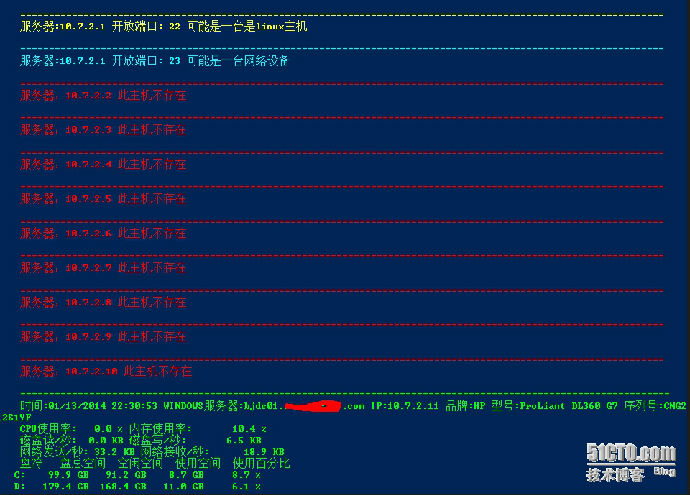
最近一直在写一个自动检测网络内主机类型的脚本。基本功能可以实现判断主机操作系统类型,如果是域内的主机可以获取主机的硬件参数和性能参数,并判断是否存在网络设备。对一个运维人员来说往往需要尽快熟悉一个陌生的网络。所以这个脚本就很方便了,如果有更好的建议欢迎指正感谢!
############################################
#Author:Lixiaosong
#Email:lixiaosong8706@gmail.com
#For:检测/24掩码网络内主机系统类型并获取windows主机参数
#Version:1.0
##############################################
Param(
[Parameter(Mandatory=$true)]$Network
)
$Ip=for($i= 1; $i-ile255; $i+= 1){"$Network.$i"}
foreach($Ipaddressin$IP){
#检测相关端口状态
$Port3389=3389 | %{ echo ((new-objectNet.Sockets.TcpClient).Connect("$Ipaddress",$_)) "$true"} 2>$null
$Port22=22 | %{ echo ((new-objectNet.Sockets.TcpClient).Connect("$Ipaddress",$_)) "$true"} 2>$null
$Port23=23 | %{ echo ((new-objectNet.Sockets.TcpClient).Connect("$Ipaddress",$_)) "$true"} 2>$null
$Pingtest=Test-connection-ComputerName$IPaddress-quiet
if($Port3389-like"$true"){
#服务器信息
$HostSN=(GWMI-ComputerName"$Ipaddress"win32_bios).SerialNUmber
$HostFirm=(GWMI-ComputerName"$Ipaddress"win32_bios).Manufacturer
$HostModel=(GWMI-ComputerName"$Ipaddress"Win32_ComputerSystem).Model
#主机信息
$HostName=(GWMI-ComputerName"$Ipaddress"Win32_ComputerSystem).DNSHostName
$DomainName=(GWMI-ComputerName"$Ipaddress"Win32_ComputerSystem).Domain
#服务器硬件资源信息
$Freemem=(GWMI-ComputerName"$Ipaddress"win32_OperatingSystem).FreePhysicalMemory#空余物理内存
$Totalmem=(GWMI-ComputerName"$Ipaddress"win32_OperatingSystem).TotalVisibleMemorySize#总物理内存
$cpu=((get-counter-ComputerName"$IPaddress"-counter"\processor(_total)\% processor time").CounterSamples|where{$_.InstanceName -eq"_total"}).CookedValue
$DiskRead=" {0:0.0} KB"-f($(((get-counter-ComputerName"$Ipaddress"-counter"\LogicalDisk(_total)\Disk Read Bytes/sec").CounterSamples|where{$_.InstanceName -eq"_total"}).CookedValue) / 1KB)
$DiskWrite="{0:0.0} KB"-f($(((get-counter-ComputerName"$Ipaddress"-counter"\LogicalDisk(_total)\Disk Write Bytes/sec").CounterSamples|where{$_.InstanceName -eq"_total"}).CookedValue) /1KB)
$NetworkSent=" {0:0.0} KB"-f($((Get-Counter-ComputerName"$Ipaddress"-Counter"\Network Interface(*)\Bytes Sent/sec").CounterSamples|%{$_.CookedValue}|sort|select-last1) / 1KB)
$NetworkReceive=" {0:0.0} KB"-f($((Get-Counter-ComputerName"$IPaddress"-Counter"\Network Interface(*)\Bytes Received/sec").CounterSamples|%{$_.CookedValue}|sort|select-last1) / 1KB)
$Havecpu= "{0:0.0} %"-f$cpu
$Permem="{0:0.0} %"-f((($Totalmem-$Freemem)/$Totalmem)*100)
$Disks= GWMI-ComputerName"$IPaddress"win32_logicaldisk|?{$_.drivetype -eq3}
#获取域内Windows主机参数
Write-host"
=================================================================================================================
时间:$(get-date) WINDOWS服务器:$HostName.$DomainName IP:$($IPaddress.Padleft(2)) 品牌:$($HostFirm.Padleft(2)) 型号:$($HostModel.Padleft(2)) 序列号:$($HostSN.Padleft(2))
CPU使用率:$($Havecpu.Padleft(8)) 内存使用率:$($Permem.Padleft(13))
磁盘读/秒:$($DiskRead.Padleft(8)) 磁盘写/秒:$($DiskWrite.Padleft(13))
网络发送/秒:$($NetworkSent.Padleft(8)) 网络接收/秒:$($NetworkReceive.Padleft(13))
盘符 盘总空间 空闲空间 使用空间 使用百分比"-ForegroundColorGreen
foreach($Diskin$Disks){
$Size= "{0:0.0} GB"-f($Disk.Size / 1GB )
$FreeSpace= "{0:0.0} GB"-f($Disk.FreeSpace / 1GB)
$Used= ([int64]$Disk.size - [int64]$Disk.freespace)
$SpaceUsed= "{0:0.0} GB"-f($Used/ 1GB)
$Percent="{0:0.0} %"-f($Used* 100 / $Disk.Size)
$n=3
Write-Host" "$Disk.deviceid.PadRight($n)-no-ForegroundColorGreen
$n=10
Write-Host$Size.Padleft($n)-no-ForegroundColorGreen
Write-Host$FreeSpace.Padleft($n)-no-ForegroundColorGreen
Write-Host$SpaceUsed.Padleft($n)-no-ForegroundColorGreen
Write-Host$Percent.Padleft($n)-ForegroundColorGreen
}
}
#判断linux主机
if($port22-like"$true"){
write-host"
================================================================================================================
服务器:$IPaddress 开放端口:"22" 可能是一台是"linux"主机"-ForegroundColorYellow
}
#判断网络设备
if($port23-like"$true"){
Write-host"
================================================================================================================
服务器:$Ipaddress 开放端口:"23" 可能是一台"网络"设备"-ForegroundColorCyan
}
#主机不存在
if($Pingtest-like"$False"){
Write-host"
================================================================================================================
服务器:$Ipaddress 此主机不存在"-ForegroundColorRed
}
}
</div>
使用方法举例:
1 将脚本保存至c:\
2 运行powershell 执行PS C:\> .\test.ps1 10.7.2 #只需输入网络的前三位
PS C:\> .\test.ps1 10.7.2
</div>