

近期在做爬虫时有时会遇到网站只提供pdf的情况,这样就不能使用scrapy直接抓取页面内容了,只能通过解析PDF的方式处理,目前的解决方案大致只有pyPDF和PDFMiner。因为据说PDFMiner更适合文本的解析,而我需要解析的正是文本,因此最后选择使用PDFMiner(这也就意味着我对pyPDF一无所知了)。
首先说明的是解析PDF是非常蛋疼的事,即使是PDFMiner对于格式不工整的PDF解析效果也不怎么样,所以连PDFMiner的开发者都吐槽PDF is evil. 不过这些并不重要。官方文档在此:http://www.unixuser.org/~euske/python/pdfminer/index.html
一.安装:
1.首先下载源文件包 http://pypi.python.org/pypi/pdfminer/,解压,然后命令行安装即可:python setup.py install
2.安装完成后使用该命令行测试:pdf2txt.py samples/simple1.pdf,如果显示以下内容则表示安装成功:
Hello World Hello World H e l l o W o r l d H e l l o W o r l d
3.如果要使用中日韩文字则需要先编译再安装:
# make cmap

python tools/conv_cmap.py pdfminer/cmap Adobe-CNS1 cmaprsrc/cid2code_Adobe_CNS1.txtreading 'cmaprsrc/cid2code_Adobe_CNS1.txt'...writing 'CNS1_H.py'......(this may take several minutes)

# python setup.py install
</div>
二.使用
由于解析PDF是一件非常耗时和内存的工作,因此PDFMiner使用了一种称作lazy parsing的策略,只在需要的时候才去解析,以减少时间和内存的使用。要解析PDF至少需要两个类:PDFParser 和 PDFDocument,PDFParser 从文件中提取数据,PDFDocument保存数据。另外还需要PDFPageInterpreter去处理页面内容,PDFDevice将其转换为我们所需要的。PDFResourceManager用于保存共享内容例如字体或图片。
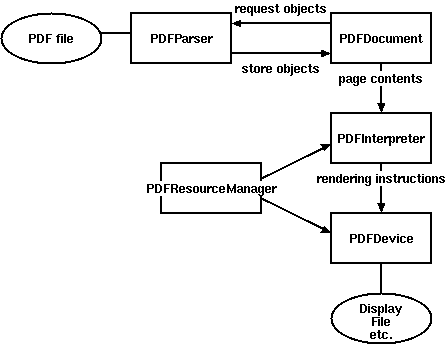
Figure 1. Relationships between PDFMiner classes
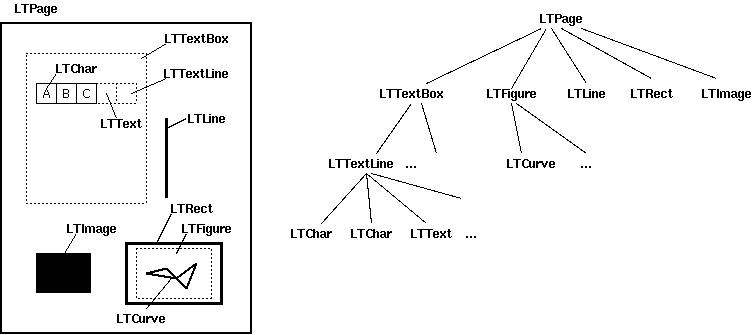
比较重要的是Layout,主要包括以下这些组件:
LTPage
Represents an entire page. May contain child objects like LTTextBox, LTFigure, LTImage, LTRect, LTCurve and LTLine.
LTTextBox
Represents a group of text chunks that can be contained in a rectangular area. Note that this box is created by geometric analysis and does not necessarily represents a logical boundary of the text. It contains a list of LTTextLine objects. get_text() method returns the text content.
LTTextLine
Contains a list of LTChar objects that represent a single text line. The characters are aligned either horizontaly or vertically, depending on the text's writing mode. get_text() method returns the text content.
LTChar
LTAnno
Represent an actual letter in the text as a Unicode string. Note that, while a LTChar object has actual boundaries, LTAnno objects does not, as these are "virtual" characters, inserted by a layout analyzer according to the relationship between two characters (e.g. a space).
LTFigure
Represents an area used by PDF Form objects. PDF Forms can be used to present figures or pictures by embedding yet another PDF document within a page. Note that LTFigure objects can appear recursively.
LTImage
Represents an image object. Embedded images can be in JPEG or other formats, but currently PDFMiner does not pay much attention to graphical objects.
LTLine
Represents a single straight line. Could be used for separating text or figures.
LTRect
Represents a rectangle. Could be used for framing another pictures or figures.
LTCurve
Represents a generic Bezier curve.
官方文档给了几个Demo但是都过于简略,虽然给了一个详细一些的Demo,但链接地址是旧的现在已经失效,不过最终还是找到了新的地址:http://denis.papathanasiou.org/posts/2010.08.04.post.html
这个Demo就比较详细了,源码如下:
#!/usr/bin/python
import sys
import os
from binascii import b2a_hex
###
### pdf-miner requirements
###
from pdfminer.pdfparser import PDFParser
from pdfminer.pdfdocument import PDFDocument, PDFNoOutlines
from pdfminer.pdfpage import PDFPage
from pdfminer.pdfinterp import PDFResourceManager, PDFPageInterpreter
from pdfminer.converter import PDFPageAggregator
from pdfminer.layout import LAParams, LTTextBox, LTTextLine, LTFigure, LTImage, LTChar
def with_pdf (pdf_doc, fn, pdf_pwd, *args):
"""Open the pdf document, and apply the function, returning the results"""
result = None
try:
# open the pdf file
fp = open(pdf_doc, 'rb')
# create a parser object associated with the file object
parser = PDFParser(fp)
# create a PDFDocument object that stores the document structure
doc = PDFDocument(parser, pdf_pwd)
# connect the parser and document objects
parser.set_document(doc)
# supply the password for initialization
if doc.is_extractable:
# apply the function and return the result
result = fn(doc, *args)
# close the pdf file
fp.close()
except IOError:
# the file doesn't exist or similar problem
pass
return result
###
### Table of Contents
###
def _parse_toc (doc):
"""With an open PDFDocument object, get the table of contents (toc) data
[this is a higher-order function to be passed to with_pdf()]"""
toc = []
try:
outlines = doc.get_outlines()
for (level,title,dest,a,se) in outlines:
toc.append( (level, title) )
except PDFNoOutlines:
pass
return toc
def get_toc (pdf_doc, pdf_pwd=''):
"""Return the table of contents (toc), if any, for this pdf file"""
return with_pdf(pdf_doc, _parse_toc, pdf_pwd)
###
### Extracting Images
###
def write_file (folder, filename, filedata, flags='w'):
"""Write the file data to the folder and filename combination
(flags: 'w' for write text, 'wb' for write binary, use 'a' instead of 'w' for append)"""
result = False
if os.path.isdir(folder):
try:
file_obj = open(os.path.join(folder, filename), flags)
file_obj.write(filedata)
file_obj.close()
result = True
except IOError:
pass
return result
def determine_image_type (stream_first_4_bytes):
"""Find out the image file type based on the magic number comparison of the first 4 (or 2) bytes"""
file_type = None
bytes_as_hex = b2a_hex(stream_first_4_bytes)
if bytes_as_hex.startswith('ffd8'):
file_type = '.jpeg'
elif bytes_as_hex == '89504e47':
file_type = '.png'
elif bytes_as_hex == '47494638':
file_type = '.gif'
elif bytes_as_hex.startswith('424d'):
file_type = '.bmp'
return file_type
def save_image (lt_image, page_number, images_folder):
"""Try to save the image data from this LTImage object, and return the file name, if successful"""
result = None
if lt_image.stream:
file_stream = lt_image.stream.get_rawdata()
if file_stream:
file_ext = determine_image_type(file_stream[0:4])
if file_ext:
file_name = ''.join([str(page_number), '_', lt_image.name, file_ext])
if write_file(images_folder, file_name, file_stream, flags='wb'):
result = file_name
return result
###
### Extracting Text
###
def to_bytestring (s, enc='utf-8'):
"""Convert the given unicode string to a bytestring, using the standard encoding,
unless it's already a bytestring"""
if s:
if isinstance(s, str):
return s
else:
return s.encode(enc)
def update_page_text_hash (h, lt_obj, pct=0.2):
"""Use the bbox x0,x1 values within pct% to produce lists of associated text within the hash"""
x0 = lt_obj.bbox[0]
x1 = lt_obj.bbox[2]
key_found = False
for k, v in h.items():
hash_x0 = k[0]
if x0 >= (hash_x0 * (1.0-pct)) and (hash_x0 * (1.0+pct)) >= x0: