

早就听说requests的库的强大,只是还没有接触,今天接触了一下,发现以前使用urllib,urllib2等方法真是太搓了……
这里写些简单的使用初步作为一个记录
一、下载
官方项目页: https://pypi.python.org/pypi/requests/#downloads
可以从上面直接下载。
二、发送无参数的get请求
>>> r = requests.get('http://httpbin.org/get')
>>> print r.text
{
 "args": {},
 "headers": {
  "Accept": "*/*",
  "Accept-Encoding": "gzip, deflate",
  "Connection": "close",
  "Host": "httpbin.org",
  "User-Agent": "python-requests/2.3.0 CPython/2.6.6 Windows/7",
  "X-Request-Id": "8a28bbea-55cd-460b-bda3-f3427d66b700"
 },
 "origin": "124.192.129.84",
 "url": "http://httpbin.org/get"
}
</div>
三、发送带参数的get请求,将key与value放入一个字典中,通过params参数来传递,其作用相当于urllib.urlencode
 >>> import requests
>>> pqyload = {'q':'杨彦星'}
>>> r = requests.get('http://www.so.com/s',params = pqyload)
>>> r.url
u'http://www.so.com/s?q=%E6%9D%A8%E5%BD%A6%E6%98%9F'
</div>
四、发送post请求,通过data参数来传递,
 >>> payload = {'a':'杨','b':'hello'}
>>> r = requests.post("http://httpbin.org/post", data=payload)
>>> print r.text
{
 "args": {},
 "data": "",
 "files": {},
 "form": {
  "a": "\u6768",
  "b": "hello"
 },
 "headers": {
  "Accept": "*/*",
  "Accept-Encoding": "gzip, deflate",
  "Connection": "close",
  "Content-Length": "19",
  "Content-Type": "application/x-www-form-urlencoded",
  "Host": "httpbin.org",
  "User-Agent": "python-requests/2.3.0 CPython/2.6.6 Windows/7",
  "X-Request-Id": "c81cb937-04b8-4a2d-ba32-04b5c0b3ba98"
 },
 "json": null,
 "origin": "124.192.129.84",
 "url": "http://httpbin.org/post"
}
>>>
</div>
可以看到,post参数已经传到了form里,data不光可以接受字典类型的数据,还可以接受json等格式
>>> payload = {'a':'杨','b':'hello'}
>>> import json
>>> r = requests.post('http://httpbin.org/post', data=json.dumps(payload))
</div>
五、发送文件的post类型,这个相当于向网站上传一张图片,文档等操作,这时要使用files参数
>>> url = 'http://httpbin.org/post'
>>> files = {'file': open('touxiang.png', 'rb')}
>>> r = requests.post(url, files=files)
</div>
定制headers,使用headers参数来传递
>>> import json
>>> url = 'https://api.github.com/some/endpoint'
>>> payload = {'some': 'data'}
>>> headers = {'content-type': 'application/json'}
>>> r = requests.post(url, data=json.dumps(payload), headers=headers)
</div>
六、响应内容
响应状态码:
r = requests.get('http://httpbin.org/get')
print r.status_code
</div>
响应头:
>>> print r.headers
{'content-length': '519', 'server': 'gunicorn/18.0', 'connection': 'keep-alive', 'date': 'Sun, 15 Jun 2014 14:19:52 GMT', 'access-control-allow-origin': '*', 'content-type': 'application/json'}
</div>
也可以取到这个个别的响应头用来做一些判断,这里的参数是不区分大小写的
r.headers[‘Content-Type']
r.headers.get(‘Content-Type')
</div>
响应内容,前面已经在应用了:
r.text
r.content
</div>
七、获取响应中的cookies
>>> r = requests.get('http://www.baidu.com')
>>> r.cookies['BAIDUID']
'D5810267346AEFB0F25CB0D6D0E043E6:FG=1'
</div>
也可以自已定义请求的COOKIES
>>> url = 'http://httpbin.org/cookies'
>>> cookies = {'cookies_are':'working'}
>>> r = requests.get(url,cookies = cookies)
>>>
>>> print r.text
{
 "cookies": {
  "cookies_are": "working"
 }
}
>>>
</div>
cookies还有很多,因为目前我也还不是很多,以后再扩充吧
八、使用timeout参数设置超时时间
>>> requests.get('http://github.com', timeout=1)
<Response [200]>
</div>
如果将时间设置成非常小的数,如
requests.get('http://github.com', timeout=0.001)
</div>
,那么如果在timeout的时间内没有连接,那么将会抛出一个Timeout的异常
九、访问中使用session
先初始化一个session对象,
s = requests.Session()</div>
然后使用这个session对象来进行访问,r = s.post(url,data = user)
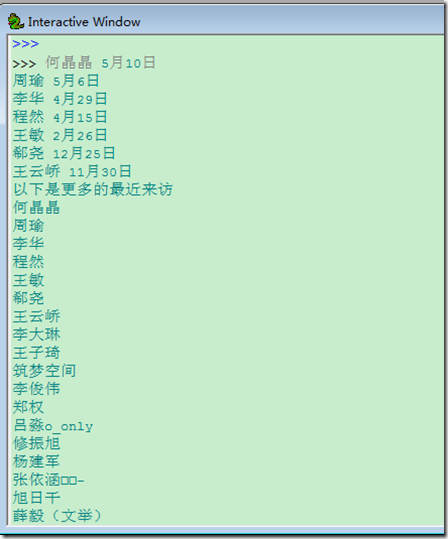
以下通过访问人人网来获取首页中的最近来访问,然后再访问查看更多的来访来读取更多的最近来访
更多的来访就是以带session的访问http://www.renren.com/myfoot.do
 #coding:utf-8
import requests
import re
url = r'http://www.renren.com/ajaxLogin'
user = {'email':'email','password':'pass'}
s = requests.Session()
r = s.post(url,data = user)
html = r.text
visit = []
first = re.compile(r'</span><span class="time-tip first-tip"><span class="tip-content">(.*?)</span>')
second = re.compile(r'</span><span class="time-tip"><span class="tip-content">(.*?)</span>')
third = re.compile(r'</span><span class="time-tip last-second-tip"><span class="tip-content">(.*?)</span>')
last = re.compile(r'</span><span class="time-tip last-tip"><span class="tip-content">(.*?)</span>')
visit.extend(first.findall(html))
visit.extend(second.findall(html))
visit.extend(third.findall(html))
visit.extend(last.findall(html))
for i in visit:
  print i
print '以下是更多的最近来访'
vm = s.get('http://www.renren.com/myfoot.do')
fm = re.compile(r'"name":"(.*?)"')
visitmore = fm.findall(vm.text)
for i in visitmore:
  print i
</div>
十、requests-cookies
Cookies就像字典一样储存了各个项的值并保存起来, 例如我们的用户名, 密码, 登录信息等都可以保存起来. 当网页再次被加载时可以从cookies中找到相关的信息并从而免除再次输入赋值的过程.
在requests中使用get等请求时同样可以赋予cookies信息. 例如我们从浏览器中获取某次网页加载时请求的cookies, 可以同样赋予requests再次使用.
requests请求时加入cookies={key:value}参数即可传递cookies.
import requests
url = 'http://httpbin.org/cookies'
cookies = dict(cookies_are='working')

r = requests.get(url, cookies=cookies)
r.text
#'{"cookies": {"cookies_are": "working"}}'
</div>
查询某次请求的cookies很简单, 就像获得headers一样使用cookies属性即可:
url = 'http://example.com/some/cookie/setting/url'
r = requests.get(url)

r.cookies['example_cookie_name']
# 'example_cookie_value'
</div>
以下函数可以分解浏览器获