

通过本文主要向大家介绍了srapy,python爬虫框架,python3 爬虫框架,python 爬虫框架剖析,python爬虫框架scrapy等相关知识,希望对您有所帮助,也希望大家支持linkedu.com www.linkedu.com
一、Cookie原理
HTTP是无状态的面向连接的协议, 为了保持连接状态, 引入了Cookie机制
Cookie是http消息头中的一种属性,包括:
- Cookie名字(Name)Cookie的值(Value)
- Cookie的过期时间(Expires/Max-Age)
- Cookie作用路径(Path)
- Cookie所在域名(Domain),使用Cookie进行安全连接(Secure)
前两个参数是Cookie应用的必要条件,另外,还包括Cookie大小(Size,不同浏览器对Cookie个数及大小限制是有差异的)。
二、模拟登陆
这次主要爬取的网站是知乎
爬取知乎就需要登陆的, 通过之前的python内建库, 可以很容易的实现表单提交。
现在就来看看如何通过Scrapy实现表单提交。
首先查看登陆时的表单结果, 依然像前面使用的技巧一样, 故意输错密码, 方面抓到登陆的网页头部和表单(我使用的Chrome自带的开发者工具中的Network功能)
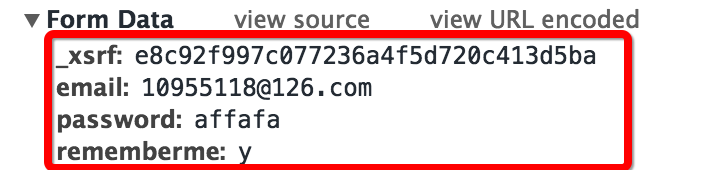
查看抓取到的表单可以发现有四个部分:
- 邮箱和密码就是个人登陆的邮箱和密码
- rememberme字段表示是否记住账号
- 第一个字段是_xsrf,猜测是一种验证机制
- 现在只有_xsrf不知道, 猜想这个验证字段肯定会实现在请求网页的时候发送过来, 那么我们查看当前网页的源码(鼠标右键然后查看网页源代码, 或者直接用快捷键)
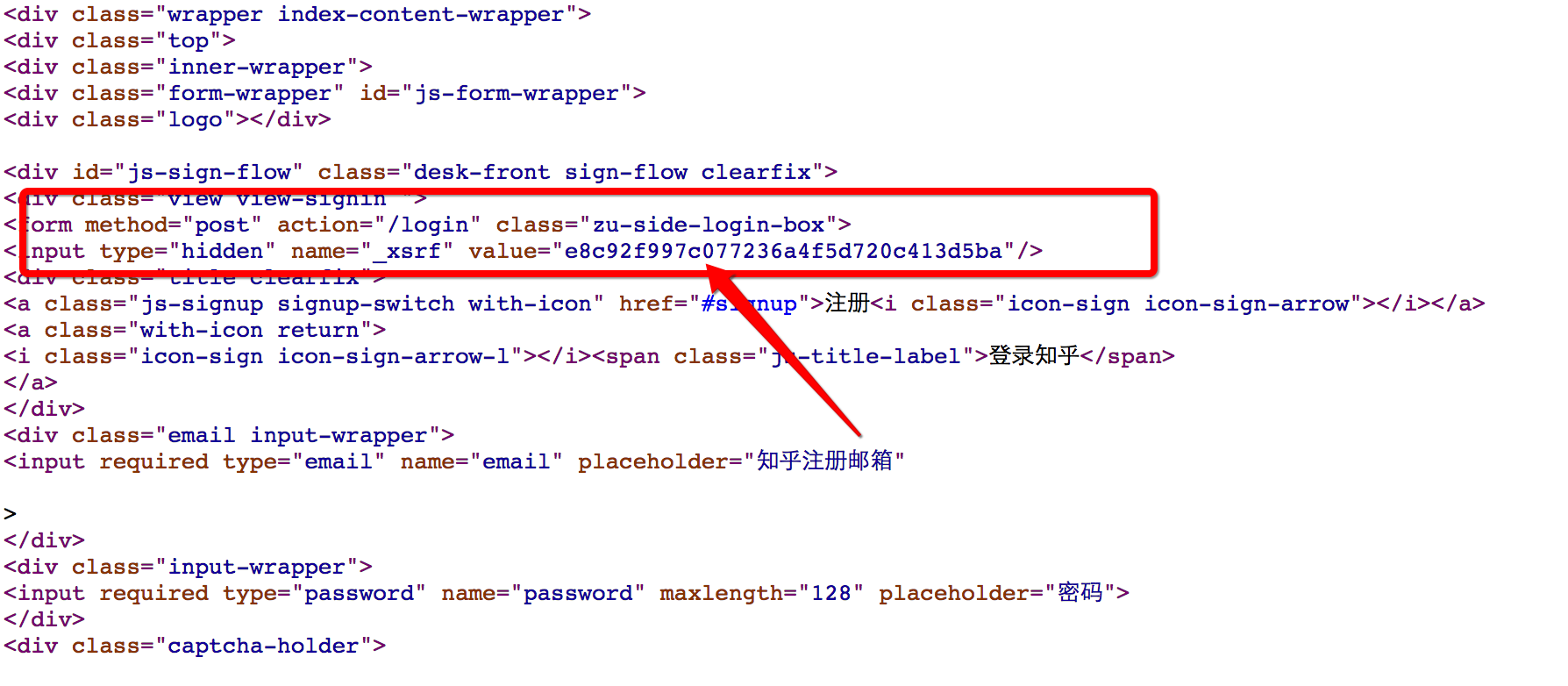
发现我们的猜测是正确的
那么现在就可以来写表单登陆功能了
def start_requests(self):
    return [Request("https://www.zhihu.com/login", callback = self.post_login)] #重写了爬虫类的方法, 实现了自定义请求, 运行成功后会调用callback回调函数

  #FormRequeset
  def post_login(self, response):
    print 'Preparing login'
    #下面这句话用于抓取请求网页后返回网页中的_xsrf字段的文字, 用于成功提交表单
    xsrf = Selector(response).xpath('//input[@name="_xsrf"]/@value').extract()[0]
    print xsrf
    #FormRequeset.from_response是Scrapy提供的一个函数, 用于post表单
    #登陆成功后, 会调用after_login回调函数
    return [FormRequest.from_response(response,
              formdata = {
              '_xsrf': xsrf,
              'email': '123456',
              'password': '123456'
              },
              callback = self.after_login
              )]
</div>
其中主要的功能都在函数的注释中说明
三、Cookie的保存
为了能使用同一个状态持续的爬取网站, 就需要保存cookie, 使用cookie保存状态, Scrapy提供了cookie处理的中间件, 可以直接拿来使用
CookiesMiddleware:
这个cookie中间件保存追踪web服务器发出的cookie, 并将这个cookie在接来下的请求的时候进行发送
Scrapy官方的文档中给出了下面的代码范例 :
for i, url in enumerate(urls):
  yield scrapy.Request("http://www.example.com", meta={'cookiejar': i},
    callback=self.parse_page)

def parse_page(self, response):
  # do some processing
  return scrapy.Request("http://www.example.com/otherpage",
    meta={'cookiejar': response.meta['cookiejar']},
    callback=self.parse_other_page)
</div>
那么可以对我们的爬虫类中方法进行修改, 使其追踪cookie
  #重写了爬虫类的方法, 实现了自定义请求, 运行成功后会调用callback回调函数
  def start_requests(self):
    return [Request("https://www.zhihu.com/login", meta = {'cookiejar' : 1}, callback = self.post_login)] #添加了meta

  #FormRequeset出问题了
  def post_login(self, response):
    print 'Preparing login'
    #下面这句话用于抓取请求网页后返回网页中的_xsrf字段的文字, 用于成功提交表单
    xsrf = Selector(response).xpath('//input[@name="_xsrf"]/@value').extract()[0]
    print xsrf
    #FormRequeset.from_response是Scrapy提供的一个函数, 用于post表单
    #登陆成功后, 会调用after_login回调函数
    return [FormRequest.from_response(response,  #"http://www.zhihu.com/login",
              meta = {'cookiejar' : response.meta['cookiejar']}, #注意这里cookie的获取
              headers = self.headers,
              formdata = {
              '_xsrf': xsrf,
              'email': '123456',
              'password': '123456'
              },
              callback = self.after_login,
              dont_filter = True
              )]
</div>
四、伪装头部
有时候登陆网站需要进行头部伪装, 比如增加防盗链的头部, 还有模拟服务器登陆
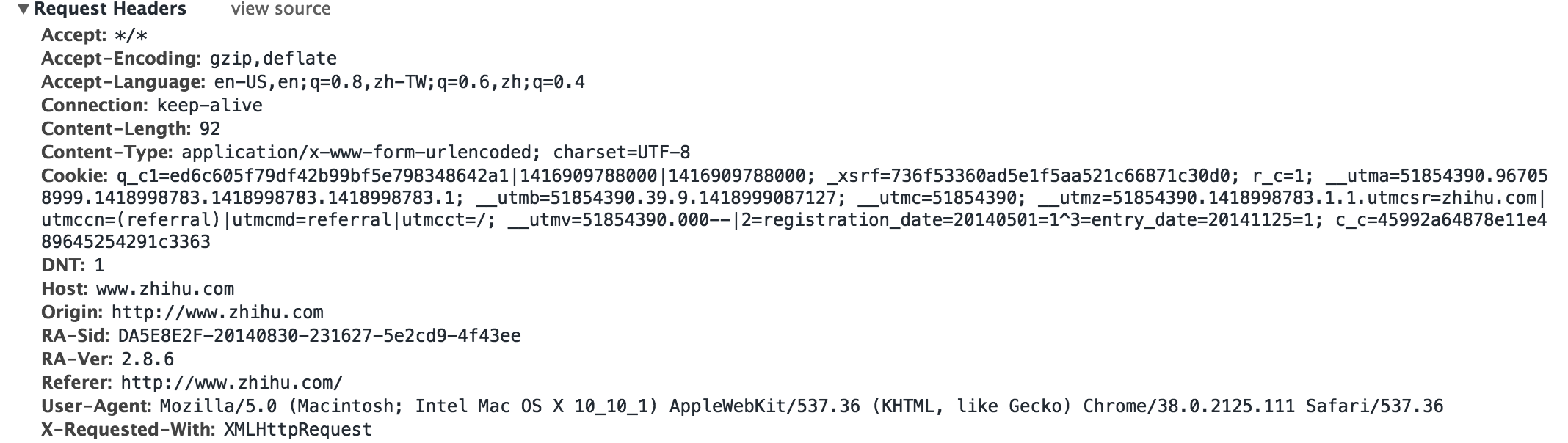
为了保险, 我们可以在头部中填充更多的字段, 如下
  headers = {
  "Accept": "*/*",
  "Accept-Encoding": "gzip,deflate",
  "Accept-Language": "en-US,en;q=0.8,zh-TW;q=0.6,zh;q=0.4",
  "Connection": "keep-alive",
  "Content-Type":" application/x-www-form-urlencoded; charset=UTF-8",
  "User-Agent": "Mozilla/5.0 (Macintosh; Intel Mac OS X 10_10_1) AppleWebKit/537.36 (KHTML, like Gecko) Chrome/38.0.2125.111 Safari/537.36",
  "Referer": "http://www.zhihu.com/"
  }
</div>
在scrapy中Request和FormRequest初始化的时候都有一个headers字段, 可以自定义头部, 这样我们可以添加headers字段
形成最终版的登陆函数
#!/usr/bin/env python
# -*- coding:utf-8 -*-
from scrapy.contrib.spiders import CrawlSpider, Rule
from scrapy.selector import Selector
from scrapy.contrib.linkextractors.sgml import SgmlLinkExtractor
from scrapy.http import Request, FormRequest
from zhihu.items import ZhihuItem
class ZhihuSipder(CrawlSpider) :
name = "zhihu"
allowed_domains = ["www.zhihu.com"]
start_urls = [
"http://www.zhihu.com"
]
rules = (
Rule(SgmlLinkExtractor(allow = ('/question/\d+#.*?', )), callback = 'parse_page', follow = True),
Rule(SgmlLinkExtractor(allow = ('/question/\d+', )), callback = 'parse_page', follow = True),
)
headers = {
"Accept": "*/*",
"Accept-Encoding": "gzip,deflate",
"Accept-Language": "en-US,en;q=0.8,zh-TW;q=0.6,zh;q=0.4",
"Connection": "keep-alive",
"Content-Type":" application/x-www-form-urlencoded; charset=UTF-8",
"User-Agent": "Mozilla/5.0 (Macintosh; Intel Mac OS X 10_10_1) AppleWebKit/537.36 (KHTML, like Gecko) Chrome/38.0.2125.111 Safari/537.36",
"Referer": "http://www.zhihu.com/"
}
#重写了爬虫类的方法, 实现了自定义请求, 运行成功后会调用callback回调函数
def start_requests(self):
return [Request("https://www.zhihu.com/login", meta = {'cookiejar' : 1}, callback = self.post_login)]
#FormRequeset出问题了
def post_login(self, response):
print 'Preparing login'
#下面这句话用于抓取请求网页后返回网页中的_xsrf字段的文字, 用于成功提交表单
xsrf = Selector(response).xpath('//input[@name="_xsrf"]/@value').extract()[0]
print xsrf
#FormRequeset.from_response是Scrapy提供的一个函数, 用于post表单
#登陆成功后, 会调用after_login回调函数
return [FormRequest.from_response(response, #"http://www.zhihu.com/login",
meta = {'cookiejar' : response.meta['cookiejar']},
headers = self.headers, #注意此处的headers
formdata = {
'_xsrf': xsrf,
'email': '1095511864@qq.com',
'password': '123456'
},
callback = self.after_login,
dont_filter = True
)]
def after_login(self, response) :
for url in self.start_urls :
yield self.make_requests_from_url(url)
def parse_page(self, response):
problem = Selector(response)
item = ZhihuItem()
item['url'] = response.url
item['name'] = problem.xpath('//span[@class="name"]/text()').extract()
print item['name']
item['title'] = problem.xpath('//h2[@class="zm-item-title zm-editable-content"]/text()').extract()
item['description'] = problem.xpath('//d