

通过本文主要向大家介绍了python搜索引擎,python 搜索文件,python 搜索,python搜索路径,python 搜索字符串等相关知识,希望对您有所帮助,也希望大家支持linkedu.com www.linkedu.com
场景:查找who删了我,直接copy代码保存到一个python文件who.py,在python环境下运行此文件
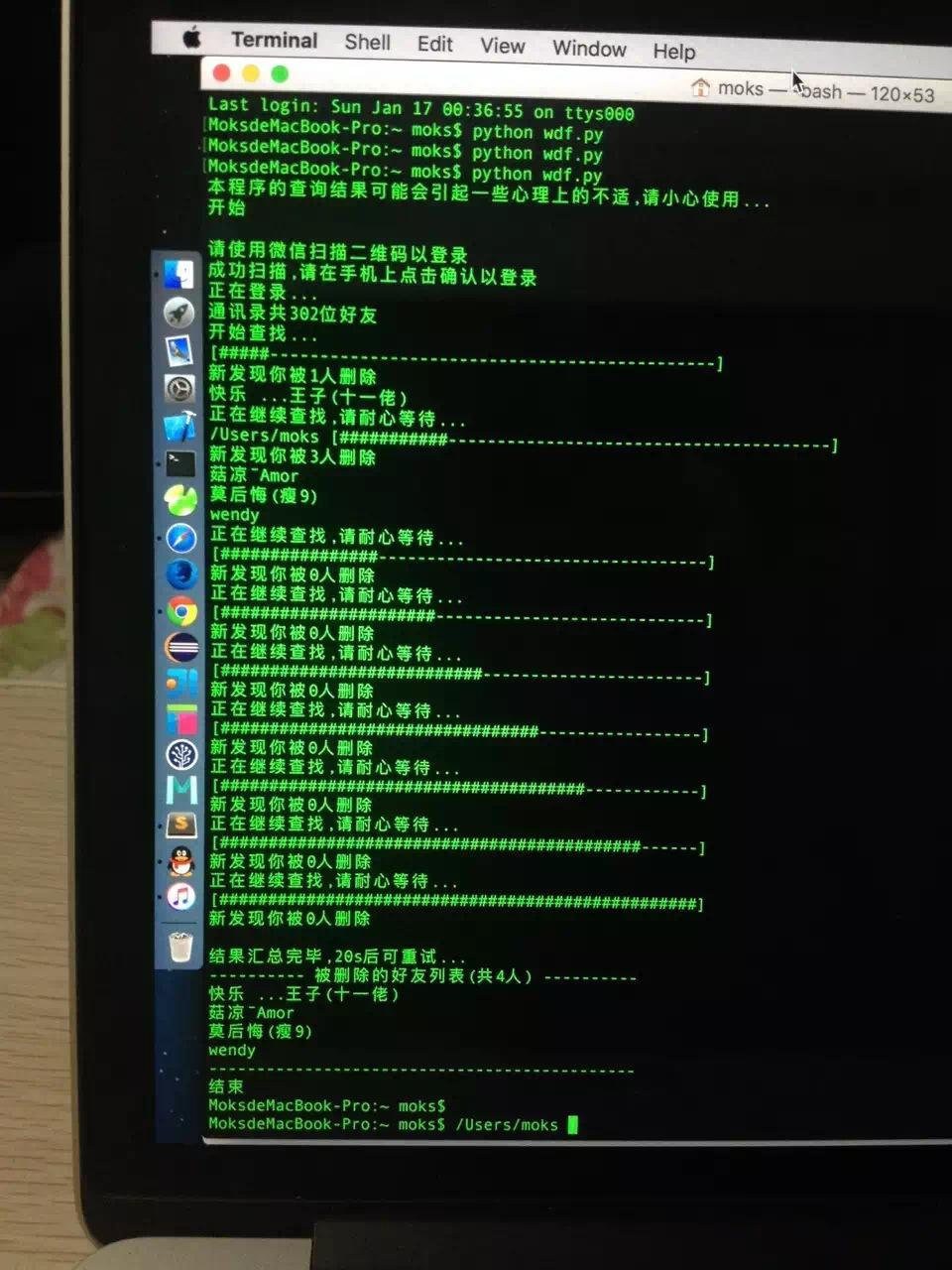
代码如下,copy保存到who.py文件在python环境直接运行:
#!/usr/bin/env python
# coding=utf-8
from __future__ import print_function
import os
try:
from urllib import urlencode, quote_plus
except ImportError:
from urllib.parse import urlencode, quote_plus
try:
import urllib2 as wdf_urllib
from cookielib import CookieJar
except ImportError:
import urllib.request as wdf_urllib
from http.cookiejar import CookieJar
import re
import time
import xml.dom.minidom
import json
import sys
import math
import subprocess
import ssl
import thread
DEBUG = False
MAX_GROUP_NUM = 35 # 每组人数
INTERFACE_CALLING_INTERVAL = 20 # 接口调用时间间隔, 间隔太短容易出现"操作太频繁", 会被限制操作半小时左右
MAX_PROGRESS_LEN = 50
QRImagePath = os.path.join(os.getcwd(), 'qrcode.jpg')
tip = 0
uuid = ''
base_uri = ''
redirect_uri = ''
push_uri = ''
skey = ''
wxsid = ''
wxuin = ''
pass_ticket = ''
deviceId = 'e000000000000000'
BaseRequest = {}
ContactList = []
My = []
SyncKey = []
try:
xrange
range = xrange
except:
# python 3
pass
def responseState(func, BaseResponse):
ErrMsg = BaseResponse['ErrMsg']
Ret = BaseResponse['Ret']
if DEBUG or Ret != 0:
print('func: %s, Ret: %d, ErrMsg: %s' % (func, Ret, ErrMsg))
if Ret != 0:
return False
return True
def getRequest(url, data=None):
try:
data = data.encode('utf-8')
except:
pass
finally:
return wdf_urllib.Request(url=url, data=data)
def getUUID():
global uuid
url = 'https://login.weixin.qq.com/jslogin'
params = {
'appid': 'wx782c26e4c19acffb',
'fun': 'new',
'lang': 'zh_CN',
'_': int(time.time()),
}
request = getRequest(url=url, data=urlencode(params))
response = wdf_urllib.urlopen(request)
data = response.read().decode('utf-8', 'replace')
# print(data)
# window.QRLogin.code = 200; window.QRLogin.uuid = "oZwt_bFfRg==";
regx = r'window.QRLogin.code = (\d+); window.QRLogin.uuid = "(\S+?)"'
pm = re.search(regx, data)
code = pm.group(1)
uuid = pm.group(2)
if code == '200':
return True
return False
def showQRImage():
global tip
url = 'https://login.weixin.qq.com/qrcode/' + uuid
params = {
't': 'webwx',
'_': int(time.time()),
}
request = getRequest(url=url, data=urlencode(params))
response = wdf_urllib.urlopen(request)
tip = 1
f = open(QRImagePath, 'wb')
f.write(response.read())
f.close()
if sys.platform.find('darwin') >= 0:
subprocess.call(['open', QRImagePath])
elif sys.platform.find('linux') >= 0:
subprocess.call(['xdg-open', QRImagePath])
else:
os.startfile(QRImagePath)
print('请使用微信扫描二维码以登录')
def waitForLogin():
global tip, base_uri, redirect_uri, push_uri
url = 'https://login.weixin.qq.com/cgi-bin/mmwebwx-bin/login?tip=%s&uuid=%s&_=%s' % (
tip, uuid, int(time.time()))
request = getRequest(url=url)
response = wdf_urllib.urlopen(request)
data = response.read().decode('utf-8', 'replace')
# print(data)
# window.code=500;
regx = r'window.code=(\d+);'
pm = re.search(regx, data)
code = pm.group(1)
if code == '201': # 已扫描
print('成功扫描,请在手机上点击确认以登录')
tip = 0
elif code == '200': # 已登录
print('正在登录...')
regx = r'window.redirect_uri="(\S+?)";'
pm = re.search(regx, data)
redirect_uri = pm.group(1) + '&fun=new'
base_uri = redirect_uri[:redirect_uri.rfind('/')]
# push_uri与base_uri对应关系(排名分先后)(就是这么奇葩..)
services = [
('wx2.qq.com', 'webpush2.weixin.qq.com'),
('qq.com', 'webpush.weixin.qq.com'),
('web1.wechat.com', 'webpush1.wechat.com'),
('web2.wechat.com', 'webpush2.wechat.com'),
('wechat.com', 'webpush.wechat.com'),
('web1.wechatapp.com', 'webpush1.wechatapp.com'),
]
push_uri = base_uri
for (searchUrl, pushUrl) in services:
if base_uri.find(searchUrl) >= 0:
push_uri = 'https://%s/cgi-bin/mmwebwx-bin' % pushUrl
break
# closeQRImage
if sys.platform.find('darwin') >= 0: # for OSX with Preview
os.system("osascript -e 'quit app \"Preview\"'")
elif code == '408': # 超时
pass
# elif code == '400' or code == '500':
return code
def login():
global skey, wxsid, wxuin, pass_ticket, BaseRequest
request = getRequest(url=redirect_uri)
response = wdf_urllib.urlopen(request)
data = response.read().decode('utf-8', 'replace')
# print(data)
doc = xml.dom.minidom.parseString(data)
root = doc.documentElement
for node in root.childNodes:
if node.nodeName == 'skey':
skey = node.childNodes[0].data
elif node.nodeName == 'wxsid':
wxsid = node.childNodes[0].data
elif node.nodeName == 'wxuin':
wxuin = node.childNodes[0].data
elif node.nodeName == 'pass_ticket':
pass_ticket = node.childNodes[0].data
# print('skey: %s, wxsid: %s, wxuin: %s, pass_ticket: %s' % (skey, wxsid,
# wxuin, pass_ticket))
if not all((skey, wxsid, wxuin, pass_ticket)):
return False
BaseRequest = {
'Uin': int(wxuin),
'Sid': wxsid,
'Skey': skey,
'DeviceID': deviceId,
}
return True
def webwxinit():
url = base_uri + \
'/webwxinit?pass_ticket=%s&skey=%s&r=%s' % (
pass_ticket, skey, int(time.time()))
params = {
'BaseRequest': BaseRequest
}
request = getRequest(url=url, data=json.dumps(params))
request.add_header('ContentType', 'application/json; charset=UTF-8')
response = wdf_urllib.urlopen(request)
data = response.read()
if DEBUG:
f = open(os.path.join(os.getcwd(), 'webwxinit.json'), 'wb')
f.write(data)
f.close()
data = data.decode('utf-8', 'replace')
# print(data)
global ContactList, My, SyncKey
dic = json.loads(data)
ContactList = dic['ContactList']
My = dic['User']
SyncKey = dic['SyncKey']
state = responseState('webwxinit', dic['BaseResponse'])
return state
def webwxgetcontact():
url = base_uri + \
'/webwxgetcontact?pass_ticket=%s&skey=%s&r=%s' % (
pass_ticket, skey, int(time.time()))
request = getRequest(url=url)
request.add_header('ContentType', 'application/json; charset=UTF-8')
response = wdf_urllib.urlopen(request)
data = response.read()
if DEBUG:
f = open(os.path.join(os.getcwd(), 'webwxgetcontact.json'), 'wb')
f.write(data)
f.close()
# print(data)
data = data.decode('utf-8', 'replace')
dic = json.loads(data)
MemberList = dic['MemberList']
# 倒序遍历,不然删除的时候出问题..
SpecialUsers = ["newsapp", "fmessage", "filehelper", "weibo", "qqmail", "tmessage", "qmessage", "qqsync", "floatbottle", "lbsapp", "shakeapp", "medianote", "qqfriend", "readerapp", "blogapp", "facebookapp", "masssendapp",
"meishiapp", "feedsapp", "voip", "blogappweixin", "weixin", "brandsessionholder", "weixinreminder", "wxid_novlwrv3lqwv11", "gh_22b87fa7cb3c", "officialaccounts", "notification_messages", "wxitil", "userexperience_alarm"]
for i in range(len(MemberList) - 1, -1, -1):
Member = MemberList[i]
if Member['VerifyFlag'] & 8 != 0: # 公众号/服务号
MemberList.remove(Member)
elif Member['UserName'] in SpecialUsers: # 特殊账号
MemberList.remove(Member)
elif Member['UserName'].find('@@') != -1: # 群聊
MemberList.remove(Member)
elif Member['UserName'] == My['UserName']: # 自己
MemberList.remove(Member)
return MemberList
def createChatroom(UserNames):
MemberList = [{'UserName': UserName} for UserName in UserNames]
url = base_uri + \
'/webwxcreatechatroom?pass_ticket=%s&r=%s' % (
pass_ticket, int(time.time()))
params = {
'BaseRequest': BaseRequest,
'MemberCount': len(MemberList),
'MemberList': MemberList,
'Topic': '',
}
request = getRequest(url=url, data=json.dumps(params))
request.add_header('ContentType', 'application/json; charset=UTF-8')
response = wdf_urllib.urlopen(request)
data = response.read().decode('utf-8', 'replace')
# print(data)
dic = json.loads(data)
ChatRoomName = dic['ChatRoomName']
MemberList = dic['MemberList']
DeletedList = []
BlockedList = []
for Member in MemberList:
if Member['MemberStatus'] == 4: # 被对方删除了
DeletedList.append(Member['UserName'])