

众所周知,Python的并行处理能力很不理想。我认为如果不考虑线程和GIL的标准参数(它们大多是合法的),其原因不是因为技术不到位,而是我们的使用方法不恰当。大多数关于Python线程和多进程的教材虽然都很出色,但是内容繁琐冗长。它们的确在开篇铺陈了许多有用信息,但往往都不会涉及真正能提高日常工作的部分。
经典例子
DDG上以“Python threading tutorial (Python线程教程)”为关键字的热门搜索结果表明:几乎每篇文章中给出的例子都是相同的类+队列。
事实上,它们就是以下这段使用producer/Consumer来处理线程/多进程的代码示例:
#Example.py
'''
Standard Producer/Consumer Threading Pattern
'''

import time
import threading
import Queue

class Consumer(threading.Thread):
  def __init__(self, queue):
    threading.Thread.__init__(self)
    self._queue = queue

  def run(self):
    while True:
      # queue.get() blocks the current thread until
      # an item is retrieved.
      msg = self._queue.get()
      # Checks if the current message is
      # the "Poison Pill"
      if isinstance(msg, str) and msg == 'quit':
        # if so, exists the loop
        break
      # "Processes" (or in our case, prints) the queue item
      print "I'm a thread, and I received %s!!" % msg
    # Always be friendly!
    print 'Bye byes!'

def Producer():
  # Queue is used to share items between
  # the threads.
  queue = Queue.Queue()

  # Create an instance of the worker
  worker = Consumer(queue)
  # start calls the internal run() method to
  # kick off the thread
  worker.start()

  # variable to keep track of when we started
  start_time = time.time()
  # While under 5 seconds..
  while time.time() - start_time < 5:
    # "Produce" a piece of work and stick it in
    # the queue for the Consumer to process
    queue.put('something at %s' % time.time())
    # Sleep a bit just to avoid an absurd number of messages
    time.sleep(1)

  # This the "poison pill" method of killing a thread.
  queue.put('quit')
  # wait for the thread to close down
  worker.join()

if __name__ == '__main__':
  Producer()
</div>
唔…….感觉有点像Java。
我现在并不想说明使用Producer / Consume来解决线程/多进程的方法是错误的——因为它肯定正确,而且在很多情况下它是最佳方法。但我不认为这是平时写代码的最佳选择。
它的问题所在(个人观点)
首先,你需要创建一个样板式的铺垫类。然后,你再创建一个队列,通过其传递对象和监管队列的两端来完成任务。(如果你想实现数据的交换或存储,通常还涉及另一个队列的参与)。
Worker越多,问题越多。
接下来,你应该会创建一个worker类的pool来提高Python的速度。下面是IBM tutorial给出的较好的方法。这也是程序员们在利用多线程检索web页面时的常用方法。
#Example2.py
'''
A more realistic thread pool example
'''

import time
import threading
import Queue
import urllib2

class Consumer(threading.Thread):
  def __init__(self, queue):
    threading.Thread.__init__(self)
    self._queue = queue

  def run(self):
    while True:
      content = self._queue.get()
      if isinstance(content, str) and content == 'quit':
        break
      response = urllib2.urlopen(content)
    print 'Bye byes!'

def Producer():
  urls = [
    'http://www.python.org', 'http://www.yahoo.com'
    'http://www.scala.org', 'http://www.google.com'
    # etc..
  ]
  queue = Queue.Queue()
  worker_threads = build_worker_pool(queue, 4)
  start_time = time.time()

  # Add the urls to process
  for url in urls:
    queue.put(url)
  # Add the poison pillv
  for worker in worker_threads:
    queue.put('quit')
  for worker in worker_threads:
    worker.join()

  print 'Done! Time taken: {}'.format(time.time() - start_time)

def build_worker_pool(queue, size):
  workers = []
  for _ in range(size):
    worker = Consumer(queue)
    worker.start()
    workers.append(worker)
  return workers

if __name__ == '__main__':
  Producer()
</div>
它的确能运行,但是这些代码多么复杂阿!它包括了初始化方法、线程跟踪列表以及和我一样容易在死锁问题上出错的人的噩梦——大量的join语句。而这些还仅仅只是繁琐的开始!
我们目前为止都完成了什么?基本上什么都没有。上面的代码几乎一直都只是在进行传递。这是很基础的方法,很容易出错(该死,我刚才忘了在队列对象上还需要调用task_done()方法(但是我懒得修改了)),性价比很低。还好,我们还有更好的方法。
介绍:Map
Map是一个很棒的小功能,同时它也是Python并行代码快速运行的关键。给不熟悉的人讲解一下吧,map是从函数语言Lisp来的。map函数能够按序映射出另一个函数。例如
urls = ['http://www.yahoo.com', 'http://www.reddit.com']
results = map(urllib2.urlopen, urls)
</div>
这里调用urlopen方法来把调用结果全部按序返回并存储到一个列表里。就像:
results = []
for url in urls:
  results.append(urllib2.urlopen(url))
</div>
Map按序处理这些迭代。调用这个函数,它就会返回给我们一个按序存储着结果的简易列表。
为什么它这么厉害呢?因为只要有了合适的库,map能使并行运行得十分流畅!
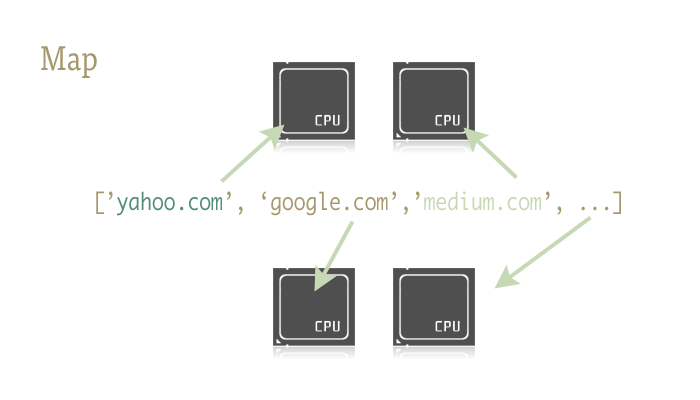
有两个能够支持通过map函数来完成并行的库:一个是multiprocessing,另一个是鲜为人知但功能强大的子文件:multiprocessing.dummy。
题外话:这个是什么?你从来没听说过dummy多进程库?我也是最近才知道的。它在多进程的说明文档里面仅仅只被提到了一句。而且那一句就是大概让你知道有这么个东西的存在。我敢说,这样几近抛售的做法造成的后果是不堪设想的!
Dummy就是多进程模块的克隆文件。唯一不同的是,多进程模块使用的是进程,而dummy则使用线程(当然,它有所有Python常见的限制)。也就是说,数据由一个传递给另一个。这能够使得数据轻松的在这两个之间进行前进和回跃,特别是对于探索性程序来说十分有用,因为你不用确定框架调用到底是IO 还是CPU模式。
准备开始
要做到通过map函数来完成并行,你应该先导入装有它们的模块:
from multiprocessing import Pool
from multiprocessing.dummy import Pool as ThreadPool
</div>
再初始化:
pool = ThreadPool()</div>
这简单的一句就能代替我们的build_worker_pool 函数在example2.py中的所有工作。换句话说,它创建了许多有效的worker,启动它们来为接下来的工作做准备,以及把它们存储在不同的位置,方便使用。
Pool对象需要一些参数,但最重要的是:进程。它决定pool中的worker数量。如果你不填的话,它就会默认为你电脑的内核数值。
如果你在CPU模式下使用多进程pool,通常内核数越大速度就越快(还有很多其它因素)。但是,当进行线程或者处理网络绑定之类的工作时,情况会比较复杂所以应该使用pool的准确大小。
pool = ThreadPool(4) # Sets the pool size to 4</div>
如果你运行过多线程,多线程间的切换将会浪费许多时间,所以你最好耐心调试出最适合的任务数。
我们现在已经创建了pool对象,马上就能有简单的并行程序了,所以让我们重新写example2.py中的url opener吧!
import urllib2 from multiprocessing.dummy import Pool as ThreadPool urls = [ 'http://www.python.org', 'http://www.python.org/about/', 'http://www.onlamp.com/pub/a/python/2003/04/17/metaclasses.html', 'http://www.python.org/doc/', 'http://www.python.org/download/', 'http://www.python.org/getit/', 'http://www.python.org/community/', 'https://wiki.python.org/moin/', 'http://planet.python.org/', 'https://wiki.python.org/moin/LocalUserGroups', 'http://www.python.org/psf/', 'http://docs.python.org/devguide/', 'http://www.python.org/community/awards/' # etc.. ] # Make the Pool of workers pool = ThreadPool(4) # Open the urls in their own threads # a