

如果你手工测试Restful 服务将会是一件非常单调乏味的事情。当然,目前有一些浏览器插件可以通过可视化的界面帮助你手工测试,例如postman、rest console,但是每次系统版本更新,你都需要去手动执行大量的测试,显然这种方式不是非常实用。Ruby拥有许多出色的gem包,你可以使用它们完成这项枯燥的工作。其中RestClient是我比较喜欢的一个。结合ruby的rspec框架使用RestClient可以编写非常强大的测试脚本。假如Github想让你测试他们的Restful API。你可能想做的第一件事就是确保端点返回你预计的响应代码。开始前,你需要确认你已经安装了相应的gems。 最便利的方式是使用bundler安装:
 source "https://rubygems.org"

 gem 'rest-client'
 gem 'rspec'
 gem 'json_expressions'
</div>
在cmd(windows,linux/mac环境请自行解决)进入你创建gemfile文件的同层目录,运行 'bundle'
rafs-computer:rafael$ bundle
Using diff-lcs 1.2.5
Using json_expressions 0.8.3
Using mime-types 2.3
Using netrc 0.7.7
Using rest-client 1.7.2
Using rspec-support 3.1.1
Using rspec-core 3.1.4
Using rspec-expectations 3.1.2
Using rspec-mocks 3.1.2
Using rspec 3.1.0
Using bundler 1.7.3
Your bundle is complete!
</div>
现在让我们来验证我们从用户终端得到200响应:
require 'rspec'
require 'rest_client'

describe 'GitHub API' do

  it 'should return information about a user' do
    result = RestClient.get 'https://api.github.com/users/rest-client', :content_type => :json, :accept => :json
    expect(result.code).to eq(200)
  end

end
</div>
在命令行执行rspec -f doc filename
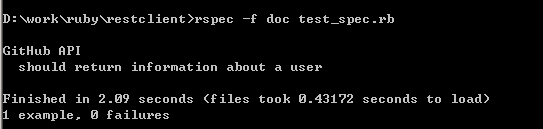
因此返回码是对的,但是我们如何知道返回的json也是对的呢?
有几种不同的方式去验证。一种方法是解析body中的json(由key,value组成),然后针对你要检查的每个key创建断言。这种方式可以使用,但是它需要你写多个断言而且是比较难于维护的。另外一种方法是和一个已知有效的json格式的数据文件比较。你可以使用json_expressions gem包去做这个事情。下面的例子是相同的spec文件。新增一个testcase用来验证json数据。
首先准备一个users.json文件
{
 "login": "rest-client",
 "id": 2386701,
 "avatar_url": "https://avatars.githubusercontent.com/u/2386701?v=3",
 "gravatar_id": "",
 "url": "https://api.github.com/users/rest-client",
 "html_url": "https://github.com/rest-client",
 "followers_url": "https://api.github.com/users/rest-client/followers",
 "following_url": "https://api.github.com/users/rest-client/following{/other_user}",
 "gists_url": "https://api.github.com/users/rest-client/gists{/gist_id}",
 "starred_url": "https://api.github.com/users/rest-client/starred{/owner}{/repo}",
 "subscriptions_url": "https://api.github.com/users/rest-client/subscriptions",
 "organizations_url": "https://api.github.com/users/rest-client/orgs",
 "repos_url": "https://api.github.com/users/rest-client/repos",
 "events_url": "https://api.github.com/users/rest-client/events{/privacy}",
 "received_events_url": "https://api.github.com/users/rest-client/received_events",
 "type": "Organization",
 "site_admin": false,
 "name": "REST-Client Team",
 "company": null,
 "blog": "",
 "location": null,
 "email": null,
 "hireable": false,
 "bio": null,
 "public_repos": 1,
 "public_gists": 0,
 "followers": 0,
 "following": 0,
 "created_at": "2012-09-20T15:01:43Z",
 "updated_at": "2015-03-11T19:08:01Z"
}
</div>
然后编写测试用例spec文件
require 'rspec'
require 'rest_client'
require 'json_expressions/rspec'


describe 'GitHub API' do

 it 'should return 200 when asking information about a user' do
  result = RestClient.get 'https://api.github.com/users/rest-client', :content_type => :json, :accept => :json
  expect(result.code).to eq(200)
 end

 it 'should return proper data for a user' do
  expected_data = JSON.parse(IO.read('users.json'))
  result = RestClient.get 'https://api.github.com/users/rest-client', :content_type => :json, :accept => :json
  expect(result).to match_json_expression(expected_data)
 end

end
</div>
这个users.json文件包含了一个已知的响应。正如你可能猜到了,一些这样的服务返回值可以改变很快。例如,"updated_at"是返回值可能经常变化的key。假如你只是想要验证key是否存在,而不关心它的值,你可以增加如下的代码到你的测试用例中。
it 'should return proper data for a user' do
  expected_data = JSON.parse(IO.read('users.json')) #解析users.json文件中的数据作为预期值
  result = RestClient.get 'https://api.github.com/users/rest-client', :content_type => :json, :accept => :json
  # expect(result).to match_json_expression(expected_data)
  expected_data['updated_at'] = wildcard_matcher
 end
</div>
</div>