

通过本文主要向大家介绍了python贪吃蛇游戏,贪吃蛇在线游戏,贪吃蛇游戏,贪吃蛇大作战小游戏,贪吃蛇游戏网页版等相关知识,希望对您有所帮助,也希望大家支持linkedu.com www.linkedu.com
最近在学Python,想做点什么来练练手,命令行的贪吃蛇一般是C的练手项目,但是一时之间找不到别的,就先做个贪吃蛇来练练简单的语法。
由于Python监听键盘很麻烦,没有C语言的kbhit(),所以这条贪吃蛇不会自己动,运行效果如下:
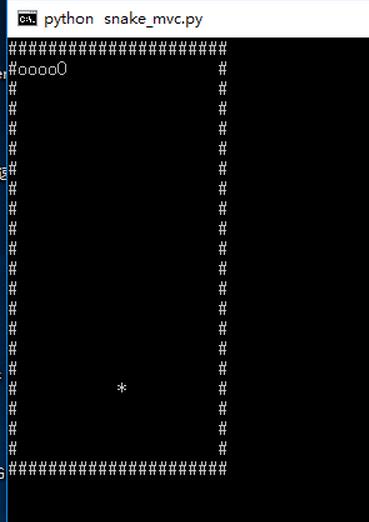
要求:用#表示边框,用*表示食物,o表示蛇的身体,O表示蛇头,使用wsad来移动
Python版本:3.6.1
系统环境:Win10
类:
board:棋盘,也就是游戏区域
snake:贪吃蛇,通过记录身体每个点来记录蛇的状态
game:游戏类
本来还想要个food类的,但是food只需要一个坐标,和一个新建,所以干脆使用list来保存坐标,新建food放在game里面,从逻辑上也没有太大问题
源码:
# Write By Guobao
# 2017/4//7
#
# 贪吃蛇
# 用#做边界,*做食物,o做身体和头部
# python 3.6.1

import copy
import random
import os
import msvcrt

# the board class, used to put everything
class board:

  __points =[]

  def __init__(self):
    self.__points.clear()
    for i in range(22):
      line = []
      if i == 0 or i == 21:
        for j in range(22):
          line.append('#')
      else:
        line.append('#')
        for j in range(20):
          line.append(' ')
        line.append('#')
      self.__points.append(line)

  def getPoint(self, location):
    return self.__points[location[0]][location[1]]

  def clear(self):
    self.__points.clear()
    for i in range(22):
      line = []
      if i == 0 or i == 21:
        for j in range(22):
          line.append('#')
      else:
        line.append('#')
        for j in range(20):
          line.append(' ')
        line.append('#')
      self.__points.append(line)

  def put_snake(self, snake_locations):
    # clear the board
    self.clear()

    # put the snake points
    for x in snake_locations:
      self.__points[x[0]][x[1]] = 'o'

    # the head
    x = snake_locations[len(snake_locations) - 1]
    self.__points[x[0]][x[1]] = 'O'

  def put_food(self, food_location):
    self.__points[food_location[0]][food_location[1]] = '*'

  def show(self):
    os.system("cls")
    for i in range(22):
      for j in range(22):
        print(self.__points[i][j], end='')
      print()

# the snake class
class snake:
  __points = []

  def __init__(self):
    for i in range(1, 6):
      self.__points.append([1, i])

  def getPoints(self):
    return self.__points

  # move to the next position
  # give the next head
  def move(self, next_head):
    self.__points.pop(0)
    self.__points.append(next_head)

  # eat the food
  # give the next head
  def eat(self, next_head):
    self.__points.append(next_head)

  # calc the next state
  # and return the direction
  def next_head(self, direction='default'):

    # need to change the value, so copy it
    head = copy.deepcopy(self.__points[len(self.__points) - 1])

    # calc the "default" direction
    if direction == 'default':
      neck = self.__points[len(self.__points) - 2]
      if neck[0] > head[0]:
        direction = 'up'
      elif neck[0] < head[0]:
        direction = 'down'
      elif neck[1] > head[1]:
        direction = 'left'
      elif neck[1] < head[1]:
        direction = 'right'

    if direction == 'up':
      head[0] = head[0] - 1
    elif direction == 'down':
      head[0] = head[0] + 1
    elif direction == 'left':
      head[1] = head[1] - 1
    elif direction == 'right':
      head[1] = head[1] + 1
    return head

# the game
class game:

  board = board()
  snake = snake()
  food = []
  count = 0

  def __init__(self):
    self.new_food()
    self.board.clear()
    self.board.put_snake(self.snake.getPoints())
    self.board.put_food(self.food)

  def new_food(self):
    while 1:
      line = random.randint(1, 20)
      column = random.randint(1, 20)
      if self.board.getPoint([column, line]) == ' ':
        self.food = [column, line]
        return

  def show(self):
    self.board.clear()
    self.board.put_snake(self.snake.getPoints())
    self.board.put_food(self.food)
    self.board.show()


  def run(self):
    self.board.show()

    # the 'w a s d' are the directions
    operation_dict = {b'w': 'up', b'W': 'up', b's': 'down', b'S': 'down', b'a': 'left', b'A': 'left', b'd': 'right', b'D': 'right'}
    op = msvcrt.getch()

    while op != b'q':
      if op not in operation_dict:
        op = msvcrt.getch()
      else:
        new_head = self.snake.next_head(operation_dict[op])

        # get the food
        if self.board.getPoint(new_head) == '*':
          self.snake.eat(new_head)
          self.count = self.count + 1
          if self.count >= 15:
            self.show()
            print("Good Job")
            break
          else:
            self.new_food()
            self.show()

        # 反向一Q日神仙
        elif new_head == self.snake.getPoints()[len(self.snake.getPoints()) - 2]:
          pass

        # rush the wall
        elif self.board.getPoint(new_head) == '#' or self.board.getPoint(new_head) == 'o':
          print('GG')
          break

        # normal move
        else:
          self.snake.move(new_head)
          self.show()
      op = msvcrt.getch()

game().run()
</div>
笔记:
1.Python 没有Switch case语句,可以利用dirt来实现
2.Python的=号是复制,复制引用,深复制需要使用copy的deepcopy()函数来实现
3.即使在成员函数内,也需要使用self来访问成员变量,这和C++、JAVA很不一样
以上就是本文的全部内容,希望对大家的学习有所帮助,也希望大家多多支持。
</div>