

通过本文主要向大家介绍了python http 状态码,http://python.org,python http,python http请求,python http server等相关知识,希望对您有所帮助,也希望大家支持linkedu.com www.linkedu.com
用Python实现批量测试一组url的可用性(可以包括HTTP状态、响应时间等)并统计出现不可用情况的次数和频率等。
类似的,这样的脚本可以判断某个服务的可用性,以及在众多的服务提供者中选择最优的。
需求以及脚本实现的功能如下:
- 默认情况下,执行脚本会检测一组url的可用性。
- 如果可用,返回从脚本所在的机器到HTTP服务器所消耗的时间和内容等信息。
- 如果url不可用,则记录并提示用户,并显示不可用发生的时间。
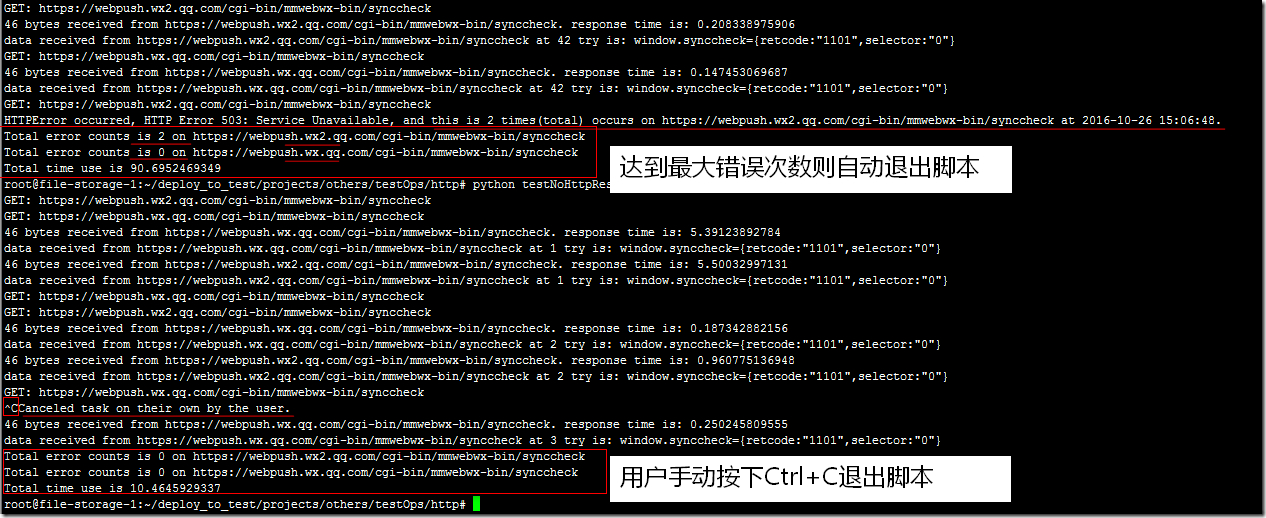
- 默认情况下,允许最大的错误次数是200,数目可以自定义,如果达到允许的最大错误次数,则在输出信息的最后,根据每一个url做出错误统计。
- 如果用户手动停止脚本,则需要在输出信息的最后,根据每一个url做出错误统计。
脚本中涉及的一些技巧:
- 使用gevent并发处理多个HTTP请求,多个请求之间无须等待响应(gevent还有很多使用技巧,可再自行学习);
- 使用signal模块捕获信号,如果捕获到则处理并退出,避免主进程接收到KeyboardInterrupt直接退出但无法处理的问题;
- 注意留意脚本中关于统计次数方面的小技巧;
脚本运行效果图( 如果图片看不清楚,请选择“在新标签页中打开图片” )如下:
脚本如下:
#!/usr/bin/python
# encoding: utf-8
# -*- coding: utf8 -*-
"""
Created by PyCharm.
File:    LinuxBashShellScriptForOps:testNoHttpResponseException,testHttpHostAvailability.py
User:    Guodong
Create Date:  2016/10/26
Create Time:  12:09

Function:
 test Http Host Availability

Some helpful message:
 For CentOS: yum -y install python-devel python-pip; pip install gevent
 For Ubuntu: apt-get -y install python-dev python-pip; pip install gevent
 For Windows: pip install gevent
 """
import signal
import time
import sys
# execute some operations concurrently using python
from gevent import monkey

monkey.patch_all()
import gevent
import urllib2

hosts = ['https://webpush.wx2.qq.com/cgi-bin/mmwebwx-bin/synccheck',
   'https://webpush.wx.qq.com/cgi-bin/mmwebwx-bin/synccheck', ]

errorStopCounts = 200

quit_flag = False
statistics = dict()


def changeQuit_flag(signum, frame):
 del signum, frame
 global quit_flag
 quit_flag = True
 print "Canceled task on their own by the user."


def testNoHttpResponseException(url):
 tryFlag = True
 global quit_flag
 errorCounts = 0
 tryCounts = 0
 global statistics
 globalStartTime = time.time()
 while tryFlag:
  if not quit_flag:
   tryCounts += 1
   print('GET: %s' % url)
   try:
    startTime = time.time()
    resp = urllib2.urlopen(url) # using module 'request' will be better, request will return header info..
    endTime = time.time()
    data = resp.read()
    responseTime = endTime - startTime
    print '%d bytes received from %s. response time is: %s' % (len(data), url, responseTime)
    print "data received from %s at %d try is: %s" % (url, tryCounts, data)
    gevent.sleep(2)
   except urllib2.HTTPError as e:
    errorCounts += 1
    statistics[url] = errorCounts
    currentTime = time.strftime('%Y-%m-%d %H:%M:%S', time.localtime())
    print "HTTPError occurred, %s, and this is %d times(total) occurs on %s at %s." % (
     e, statistics[url], url, currentTime)

    if errorCounts >= errorStopCounts:
     globalEndTime = time.time()
     tryFlag = False
  else:
   globalEndTime = time.time()
   break

 for url in statistics:
  print "Total error counts is %d on %s" % (statistics[url], url)
  hosts.remove(url)
 for url in hosts:
  print "Total error counts is 0 on %s" % url
 globalUsedTime = globalEndTime - globalStartTime
 print "Total time use is %s" % globalUsedTime
 sys.exit(0)


try:
 # Even if the user cancelled the task,
 # it also can statistics the number of errors and the consumption of time for each host.
 signal.signal(signal.SIGINT, changeQuit_flag)

 gevent.joinall([gevent.spawn(testNoHttpResponseException, host) for host in hosts])
except KeyboardInterrupt:
 # Note: this line can NOT be reached, because signal has been captured!
 print "Canceled task on their own by the user."
 sys.exit(0)
</div>
</div>