通过本文主要向大家介绍了python实例,python程序实例,python脚本实例,python项目实例,python实例教程等相关知识,希望对您有所帮助,也希望大家支持linkedu.com www.linkedu.com
我们先来看一个例子:
#encoding=utf-8
#
#by panda
#桥接模式

def printInfo(info):
  print unicode(info, 'utf-8').encode('gbk')

#抽象类:手机品牌
class HandsetBrand():
  soft = None
  def SetHandsetSoft(self, soft):
    self.soft = soft

  def Run(self):
    pass

#具体抽象类:手机品牌1
class HandsetBrand1(HandsetBrand):
  def Run(self):
    printInfo('手机品牌1:')
    self.soft.Run()

#具体抽象类:手机品牌2
class HandsetBrand2(HandsetBrand):
  def Run(self):
    printInfo('手机品牌2:')
    self.soft.Run()


#功能类:手机软件
class HandsetSoft():
  def Run(self):
    pass

#具体功能类:游戏
class HandsetGame(HandsetSoft):
  def Run(self):
    printInfo('运行手机游戏')

#具体功能类:通讯录
class HandsetAddressList(HandsetSoft):
  def Run(self):
    printInfo('运行手机通信录')

def clientUI():
  h1 = HandsetBrand1()
  h1.SetHandsetSoft(HandsetAddressList())
  h1.Run()
  h1.SetHandsetSoft(HandsetGame())
  h1.Run()

  h2 = HandsetBrand2()
  h2.SetHandsetSoft(HandsetAddressList())
  h2.Run()
  h2.SetHandsetSoft(HandsetGame())
  h2.Run()
  return

if __name__ == '__main__':
  clientUI();
</div>
可以总结出类图是这样的:
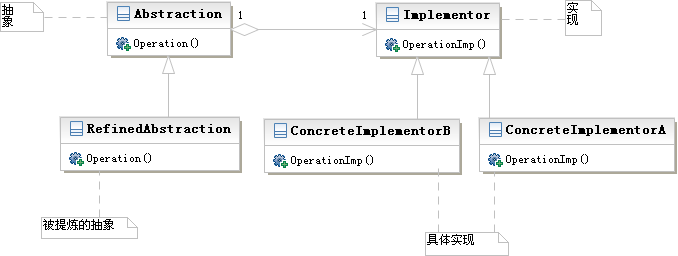
所以,桥接模式的概念在于将系统抽象部分与它的实现部分分离,使它们可以独立地变化。
由于目标系统存在多个角度的分类,每一种分类都会有多种变化,那么就可以把多角度分离出来,让它们独立变化,减少它们之间的耦合。
下面我们再来看一个实例:
基本原理请参考相关书籍,这里直接给实例
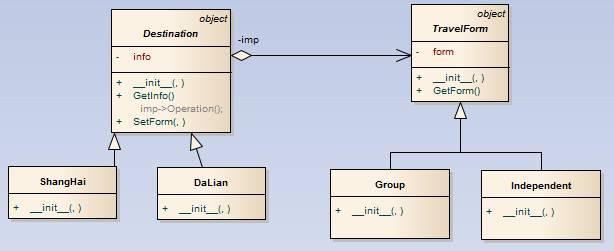
假期旅游 从目的地角度可以分为 上海和大连,从方式角度可以分为跟团和独体
桥接模式把这两种分类连接起来可以进行选择。
类图:
# -*- coding: utf-8 -*-
#######################################################
#
# tour.py
# Python implementation of the Class DaLian
# Generated by Enterprise Architect
# Created on:   11-十二月-2012 16:53:52
#
#######################################################

from __future__ import division
from __future__ import print_function
from __future__ import unicode_literals
from future_builtins import *


class TravelForm(object):
  """This class defines the interface for implementation classes.
  """
  def __init__(self, form="stay at home"):
    self.form=form
    pass

  def GetForm(self):
    return self.form
    pass
  pass

class Group(TravelForm):
  """This class implements the Implementor interface and defines its concrete
  implementation.
  """
  def __init__(self, form="by group"):
    super(Group,self).__init__(form)
    pass
  pass

class Independent(TravelForm):
  """This class implements the Implementor interface and defines its concrete
  implementation.
  """
  def __init__(self, form="by myself"):
    super(Independent,self).__init__(form)
    pass

class Destination(object):
  """This class (a) defines the abstraction's interface, and (b) maintains a
  reference to an object of type Implementor.
  """
  m_TravelForm= TravelForm()

  def __init__(self, info):
    self.info=info
    pass

  def GetInfo(self):
    # imp->Operation();
    return print(self.info + " " +self.form.GetForm())
    pass

  def SetForm(self, form):
    self.form=form
    pass

class DaLian(Destination):
  """This class extends the interface defined by Abstraction.
  """
  def __init__(self, info="Go to DaLian "):
    super(DaLian,self).__init__(info)
    pass

class ShangHai(Destination):
  """This class extends the interface defined by Abstraction.
  """
  def __init__(self, info="Go to ShangHai"):
    super(ShangHai,self).__init__(info)
    pass
#客户端
if(__name__=="__main__"):

  destination=ShangHai()
  destination.SetForm(Group())
  destination.GetInfo()


  destination=DaLian()
  destination.SetForm(Independent())
  destination.GetInfo()
</div>
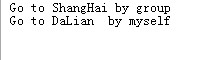
运行结果