

1. Beautiful Soup的简介
简单来说,Beautiful Soup是python的一个库,最主要的功能是从网页抓取数据。官方解释如下:
Beautiful Soup提供一些简单的、python式的函数用来处理导航、搜索、修改分析树等功能。它是一个工具箱,通过解析文档为用户提供需要抓取的数据,因为简单,所以不需要多少代码就可以写出一个完整的应用程序。
Beautiful Soup自动将输入文档转换为Unicode编码,输出文档转换为utf-8编码。你不需要考虑编码方式,除非文档没有指定一个编码方式,这时,Beautiful Soup就不能自动识别编码方式了。然后,你仅仅需要说明一下原始编码方式就可以了。
Beautiful Soup已成为和lxml、html6lib一样出色的python解释器,为用户灵活地提供不同的解析策略或强劲的速度。
废话不多说,我们来试一下吧~
2. Beautiful Soup 安装
Beautiful Soup 3 目前已经停止开发,推荐在现在的项目中使用Beautiful Soup 4,不过它已经被移植到BS4了,也就是说导入时我们需要 import bs4 。所以这里我们用的版本是 Beautiful Soup 4.3.2 (简称BS4),另外据说 BS4 对 Python3 的支持不够好,不过我用的是 Python2.7.7,如果有小伙伴用的是 Python3 版本,可以考虑下载 BS3 版本。
如果你用的是新版的Debain或Ubuntu,那么可以通过系统的软件包管理来安装,不过它不是最新版本,目前是4.2.1版本
sudo apt-get install Python-bs4</div>
如果想安装最新的版本,请直接下载安装包来手动安装,也是十分方便的方法。在这里我安装的是 Beautiful Soup 4.3.2
Beautiful Soup 3.2.1Beautiful Soup 4.3.2</div>
下载完成之后解压
运行下面的命令即可完成安装
sudo python setup.py install</div>
如下图所示,证明安装成功了
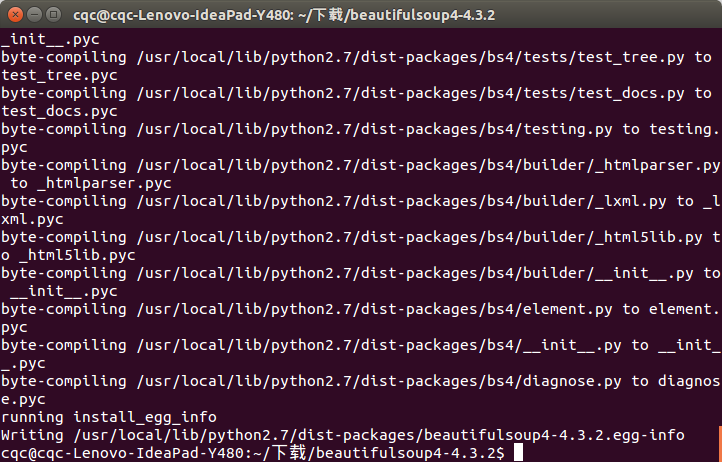
然后需要安装 lxml
sudo apt-get install Python-lxml</div>
Beautiful Soup支持Python标准库中的HTML解析器,还支持一些第三方的解析器,如果我们不安装它,则 Python 会使用 Python默认的解析器,lxml 解析器更加强大,速度更快,推荐安装。
3. 开启Beautiful Soup 之旅
在这里先分享官方文档链接,不过内容是有些多,也不够条理,在此本文章做一下整理方便大家参考。
官方文档
4. 创建 Beautiful Soup 对象
首先必须要导入 bs4 库
from bs4 import BeautifulSoup</div>
我们创建一个字符串,后面的例子我们便会用它来演示
html = """
<html><head><title>The Dormouse's story</title></head>
<body>
<p class="title" name="dromouse"><b>The Dormouse's story</b></p>
<p class="story">Once upon a time there were three little sisters; and their names were
<a href="http://example.com/elsie" class="sister" id="link1"><!-- Elsie --></a>,
<a href="http://example.com/lacie" class="sister" id="link2">Lacie</a> and
<a href="http://example.com/tillie" class="sister" id="link3">Tillie</a>;
and they lived at the bottom of a well.</p>
<p class="story">...</p>
"""
</div>
创建 beautifulsoup 对象
soup = BeautifulSoup(html)</div>
另外,我们还可以用本地 HTML 文件来创建对象,例如
soup = BeautifulSoup(open('index.html'))
</div>
上面这句代码便是将本地 index.html 文件打开,用它来创建 soup 对象
下面我们来打印一下 soup 对象的内容,格式化输出
print soup.prettify()

<html>
 <head>
 <title>
  The Dormouse's story
 </title>
 </head>
 <body>
 <p class="title" name="dromouse">
  <b>
  The Dormouse's story
  </b>
 </p>
 <p class="story">
  Once upon a time there were three little sisters; and their names were
  <a class="sister" href="http://example.com/elsie" id="link1">
  <!-- Elsie -->
  </a>
  ,
  <a class="sister" href="http://example.com/lacie" id="link2">
  Lacie
  </a>
  and
  <a class="sister" href="http://example.com/tillie" id="link3">
  Tillie
  </a>
  ;
and they lived at the bottom of a well.
 </p>
 <p class="story">
  ...
 </p>
 </body>
</html>
</div>
以上便是输出结果,格式化打印出了它的内容,这个函数经常用到,小伙伴们要记好咯。
5. 四大对象种类
Beautiful Soup将复杂HTML文档转换成一个复杂的树形结构,每个节点都是Python对象,所有对象可以归纳为4种:
- Tag
- NavigableString
- BeautifulSoup
- Comment
下面我们进行一一介绍
(1)Tag
Tag 是什么?通俗点讲就是 HTML 中的一个个标签,例如
<title>The Dormouse's story</title>

<a class="sister" href="http://example.com/elsie" id="link1">Elsie</a>
</div>
上面的 title a 等等 HTML 标签加上里面包括的内容就是 Tag,下面我们来感受一下怎样用 Beautiful Soup 来方便地获取 Tags
下面每一段代码中注释部分即为运行结果
print soup.title
#<title>The Dormouse's story</title>

print soup.head
#<head><title>The Dormouse's story</title></head>

print soup.a
#<a class="sister" href="http://example.com/elsie" id="link1"><!-- Elsie --></a>

print soup.p
#<p class="title" name="dromouse"><b>The Dormouse's story</b></p>
</div>
我们可以利用 soup加标签名轻松地获取这些标签的内容,是不是感觉比正则表达式方便多了?不过有一点是,它查找的是在所有内容中的第一个符合要求的标签,如果要查询所有的标签,我们在后面进行介绍。
我们可以验证一下这些对象的类型
print type(soup.a)
#<class 'bs4.element.Tag'>
</div>
对于 Tag,它有两个重要的属性,是 name 和 attrs,下面我们分别来感受一下
name

print soup.name
print soup.head.name
#[document]
#head
</div>
soup 对象本身比较特殊,它的 name 即为 [document],对于其他内部标签,输出的值便为标签本身的名称。
attrs

print soup.p.attrs
#{'class': ['title'], 'name': 'dromouse'}
</div>
在这里,我们把 p 标签的所有属性打印输出了出来,得到的类型是一个字典。
如果我们想要单独获取某个属性,可以这样,例如我们获取它的 class 叫什么
print soup.p['class']
#['title']
</div>
还可以这样,利用get方法,传入属性的名称,二者是等价的
print soup.p.get('class')
#['title']
</div>
我们可以对这些属性和内容等等进行修改,例如
soup.p['class']="newClass"
print soup.p
#<p class="newClass" name="dromouse"><b>The Dormouse's story</b></p>
</div>
还可以对这个属性进行删除,例
您可能想查找下面的文章:
- Python利用Beautiful Soup模块创建对象详解
- Python利用Beautiful Soup模块修改内容方法示例
- Python利用Beautiful Soup模块搜索内容详解
- Python利用Beautiful Soup模块创建对象详解
- Python利用Beautiful Soup模块修改内容方法示例
- Python使用BeautifulSoup库解析HTML基本使用教程
- python基于BeautifulSoup实现抓取网页指定内容的方法
- Python中使用Beautiful Soup库的超详细教程
- Python中使用Beautiful Soup库的超详细教程
- python使用BeautifulSoup分页网页中超链接的方法