

shichen2014 通过本文主要向大家介绍了python pygame模块,python安装pygame,python pygame,python3.5 pygame,python3 pygame等相关知识,希望对您有所帮助,也希望大家支持linkedu.com www.linkedu.com
本文实例讲述了python中pygame模块用法,分享给大家供大家参考。具体方法如下:
import pygame, sys
from pygame.locals import *

#set up pygame
pygame.init()

windowSurface = pygame.display.set_mode((500, 400), 0, 32)
pygame.display.set_caption("hello, world")

BLACK = (0, 0, 0)
WHITE = (255, 255, 255)
RED = (255, 0, 0)
GREEN = (0, 255, 0)
BLUE = (0, 0, 255)

basicFont = pygame.font.SysFont(None, 48)
text = basicFont.render("Hello ,world", True, WHITE, BLUE)
textRect = text.get_rect()

textRect.centerx = windowSurface.get_rect().centerx
textRect.centery = windowSurface.get_rect().centery

windowSurface.fill(WHITE)

pygame.draw.polygon(windowSurface, GREEN, ((146, 0),
(291, 106), (236, 277), (56, 277), (0, 106)))

pygame.draw.line(windowSurface, BLUE, (60, 60), (120,
60), 4)
pygame.draw.line(windowSurface, BLUE, (120, 60), (60,
120))
pygame.draw.line(windowSurface, BLUE, (60, 120), (120,
120), 4)
pygame.draw.circle(windowSurface, BLUE, (300, 50), 20, 0)

pygame.draw.ellipse(windowSurface, RED, (300, 250, 40,
80), 1)

pygame.draw.rect(windowSurface, RED, (textRect.left - 20,
textRect.top - 20, textRect.width + 40, textRect.height + 40))

pixArray = pygame.PixelArray(windowSurface)
pixArray[480][380] = BLACK
del pixArray

windowSurface.blit(text, textRect)

pygame.display.update()

while True:
  for event in pygame.event.get():
    if event.type == QUIT:
      pygame.quit()
      sys.exit()
</div>
运行后打出的图片如下:
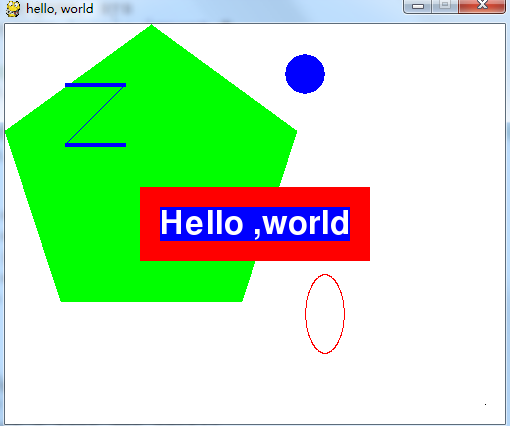
希望本文所述对大家的Python程序设计有所帮助。
</div>