

goldensun 通过本文主要向大家介绍了python pygame模块,python安装pygame,python pygame,python3.5 pygame,python3 pygame等相关知识,希望对您有所帮助,也希望大家支持linkedu.com www.linkedu.com
文章先介绍了关于俄罗斯方块游戏的几个术语。
- 边框——由10*20个空格组成,方块就落在这里面。
- 盒子——组成方块的其中小方块,是组成方块的基本单元。
- 方块——从边框顶掉下的东西,游戏者可以翻转和改变位置。每个方块由4个盒子组成。
- 形状——不同类型的方块。这里形状的名字被叫做T, S, Z ,J, L, I , O。如下图所示:
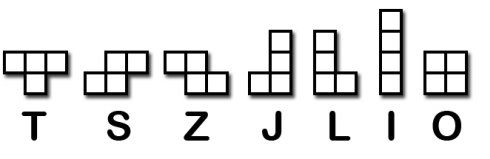
模版——用一个列表存放形状被翻转后的所有可能样式。全部存放在变量里,变量名字如S_SHAPE_TEMPLATE or J_SHAPE_TEMPLATE
着陆——当一个方块到达边框的底部或接触到在其他的盒子话,我们就说这个方块着陆了。那样的话,另一个方块就会开始下落。
下面先把代码敲一遍,试着了解作者意图,体会俄罗斯方块游戏的制作过程。
import random, time, pygame, sys
from pygame.locals import *
FPS = 25
WINDOWWIDTH = 640
WINDOWHEIGHT = 480
BOXSIZE = 20
BOARDWIDTH = 10
BOARDHEIGHT = 20
BLANK = '.'
MOVESIDEWAYSFREQ = 0.15
MOVEDOWNFREQ = 0.1
XMARGIN = int((WINDOWWIDTH - BOARDWIDTH * BOXSIZE) / 2)
TOPMARGIN = WINDOWHEIGHT - (BOARDHEIGHT * BOXSIZE) - 5
# R G B
WHITE = (255, 255, 255)
GRAY = (185, 185, 185)
BLACK = ( 0, 0, 0)
RED = (155, 0, 0)
LIGHTRED = (175, 20, 20)
GREEN = ( 0, 155, 0)
LIGHTGREEN = ( 20, 175, 20)
BLUE = ( 0, 0, 155)
LIGHTBLUE = ( 20, 20, 175)
YELLOW = (155, 155, 0)
LIGHTYELLOW = (175, 175, 20)
BORDERCOLOR = BLUE
BGCOLOR = BLACK
TEXTCOLOR = WHITE
TEXTSHADOWCOLOR = GRAY
COLORS = ( BLUE, GREEN, RED, YELLOW)
LIGHTCOLORS = (LIGHTBLUE, LIGHTGREEN, LIGHTRED, LIGHTYELLOW)
assert len(COLORS) == len(LIGHTCOLORS) # each color must have light color
TEMPLATEWIDTH = 5
TEMPLATEHEIGHT = 5
S_SHAPE_TEMPLATE = [['.....',
'.....',
'..OO.',
'.OO..',
'.....'],
['.....',
'..O..',
'..OO.',
'...O.',
'.....']]
Z_SHAPE_TEMPLATE = [['.....',
'.....',
'.OO..',
'..OO.',
'.....'],
['.....',
'..O..',
'.OO..',
'.O...',
'.....']]
I_SHAPE_TEMPLATE = [['..O..',
'..O..',
'..O..',
'..O..',
'.....'],
['.....',
'.....',
'OOOO.',
'.....',
'.....']]
O_SHAPE_TEMPLATE = [['.....',
'.....',
'.OO..',
'.OO..',
'.....']]
J_SHAPE_TEMPLATE = [['.....',
'.O...',
'.OOO.',
'.....',
'.....'],
['.....',
'..OO.',
'..O..',
'..O..',
'.....'],
['.....',
'.....',
'.OOO.',
'...O.',
'.....'],
['.....',
'..O..',
'..O..',
'.OO..',
'.....']]
L_SHAPE_TEMPLATE = [['.....',
'...O.',
'.OOO.',
'.....',
'.....'],
['.....',
'..O..',
'..O..',
'..OO.',
'.....'],
['.....',
'.....',
'.OOO.',
'.O...',
'.....'],
['.....',
'.OO..',
'..O..',
'..O..',
'.....']]
T_SHAPE_TEMPLATE = [['.....',
'..O..',
'.OOO.',
'.....',
'.....'],
['.....',
'..O..',
'..OO.',
'..O..',
'.....'],
['.....',
'.....',
'.OOO.',
'..O..',
'.....'],
['.....',
'..O..',
'.OO..',
'..O..',
'.....']]
PIECES = {'S': S_SHAPE_TEMPLATE,
'Z': Z_SHAPE_TEMPLATE,
'J': J_SHAPE_TEMPLATE,
'L': L_SHAPE_TEMPLATE,
'I': I_SHAPE_TEMPLATE,
'O': O_SHAPE_TEMPLATE,
'T': T_SHAPE_TEMPLATE}
def main():
global FPSCLOCK, DISPLAYSURF, BASICFONT, BIGFONT
pygame.init()
FPSCLOCK = pygame.time.Clock()
DISPLAYSURF = pygame.display.set_mode((WINDOWWIDTH, WINDOWHEIGHT))
BASICFONT = pygame.font.Font('freesansbold.ttf', 18)
BIGFONT = pygame.font.Font('freesansbold.ttf', 100)
pygame.display.set_caption('Tetromino')
showTextScreen('Tetromino')
while True: # game loop
if random.randint(0, 1) == 0:
pygame.mixer.music.load('tetrisb.mid')
else:
pygame.mixer.music.load('tetrisc.mid')
pygame.mixer.music.play(-1, 0.0)
runGame()
pygame.mixer.music.stop()
showTextScreen('Game Over')
def runGame():
# setup variables for the start of the game
board = getBlankBoard()
lastMoveDownTime = time.time()
lastMoveSidewaysTime = time.time()
lastFallTime = time.time()
movingDown = False # note: there is no movingUp variable
movingLeft = False
movingRight = False
score = 0
level, fallFreq = calculateLevelAndFallFreq(score)
fallingPiece = getNewPiece()
nextPiece = getNewPiece()
while True: # game loop
if fallingPiece == None:
# No falling piece in play, so start a new piece at the top
fallingPiece = nextPiece
nextPiece = getNewPiece()
lastFallTime = time.time() # reset lastFallTime
if not isValidPosition(board, fallingPiece):
return # can't fit a new piece on the board, so game over
checkForQuit()
for event in pygame.event.get(): # event handling loop
if event.type == KEYUP:
if (event.key == K_p):
# Pausing the game
DISPLAYSURF.fill(BGCOLOR)
pygame.mixer.music.stop()
showTextScreen('Paused') # pause until a key press
pygame.mixer.music.play(-1, 0.0)
lastFallTime = time.time()
lastMoveDownTime = time.time()
lastMoveSidewaysTime = time.time()
elif (event.key == K_LEFT or event.key == K_a):
movingLeft = False
elif (event.key == K_RIGHT or event.key == K_d):
movingRight = False
elif (event.key == K_DOWN or event.key == K_s):
movingDown = False
elif event.type == KEYDOWN:
# moving the piece sideways
if (event.key == K_LEFT or event.key == K_a) and isValidPosition(board, fallingPiece, adjX=-1):
fallingPiece['x'] -= 1
movingLeft = True
movingRight = False
lastMoveSidewaysTime = time.time()
elif (event.key == K_RIGHT or event.key == K_d) and isValidPosition(board, fallingPiece, adjX=1):
fallingPiece['x'] += 1
movingRight = True
movingLeft = False
lastMoveSidewaysTime = time.time()
# rotating the piece (if there is room to rotate)
elif (event.key == K_UP or event.key == K_w):
fallingPiece['rotation'] = (fallingPiece['rotation'] + 1) % len(PIECES[fallingPiece['shape']])
if not isValidPosition(board, fallingPiece):
fallingPiece['rotation'] = (fallingPiece['rotation'] - 1) % len(PIECES[fallingPiece['shape']])
elif (event.key == K_q): # rotate the other direction
fallingPiece['rotation'] = (fallingPiece['rotation'] - 1) % len(PIECES[fallingPiece['shape']])
if not isValidPosition(board, fallingPiece):
fallingPiece['rotation'] = (fallingPiece['rotation'] + 1) % len(PIECES[fallingPiece['shape']])
# making the piece fall faster with the down key
elif (event.key == K_DOWN or event.key == K_s):
movingDown = True