

通过本文主要向大家介绍了python爬虫工程师,python爬虫课程,python爬虫源码,python爬虫技术,python3爬虫教程等相关知识,希望对您有所帮助,也希望大家支持linkedu.com www.linkedu.com
本文主要介绍了数据处理方面的内容,希望大家仔细阅读。
一、数据分析

得到了以下列字符串开头的文本数据,我们需要进行处理
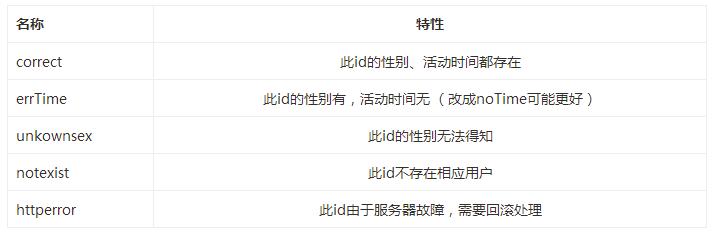
二、回滚
我们需要对httperror的数据进行再处理
因为代码的原因,具体可见本系列文章(二),会导致文本里面同一个id连续出现几次httperror记录:
//httperror265001_266001.txt
265002 httperror
265002 httperror
265002 httperror
265002 httperror
265003 httperror
265003 httperror
265003 httperror
265003 httperror
</div>
所以我们在代码里要考虑这种情形,不能每一行的id都进行处理,是判断是否重复的id。
java里面有缓存方法可以避免频繁读取硬盘上的文件,python其实也有,可以见这篇文章。
def main():
  reload(sys)
  sys.setdefaultencoding('utf-8')
  global sexRe,timeRe,notexistRe,url1,url2,file1,file2,file3,file4,startNum,endNum,file5
  sexRe = re.compile(u'em>\u6027\u522b</em>(.*?)</li')
  timeRe = re.compile(u'em>\u4e0a\u6b21\u6d3b\u52a8\u65f6\u95f4</em>(.*?)</li')
  notexistRe = re.compile(u'(p>)\u62b1\u6b49\uff0c\u60a8\u6307\u5b9a\u7684\u7528\u6237\u7a7a\u95f4\u4e0d\u5b58\u5728<')
  url1 = 'http://rs.xidian.edu.cn/home.php?mod=space&uid=%s'
  url2 = 'http://rs.xidian.edu.cn/home.php?mod=space&uid=%s&do=profile'
  file1 = 'ruisi\\correct_re.txt'
  file2 = 'ruisi\\errTime_re.txt'
  file3 = 'ruisi\\notexist_re.txt'
  file4 = 'ruisi\\unkownsex_re.txt'
  file5 = 'ruisi\\httperror_re.txt'

  #遍历文件夹里面以httperror开头的文本
  for filename in os.listdir(r'E:\pythonProject\ruisi'):
    if filename.startswith('httperror'):
      count = 0
      newName = 'E:\\pythonProject\\ruisi\\%s' % (filename)
      readFile = open(newName,'r')
      oldLine = '0'
      for line in readFile:
        #newLine 用来比较是否是重复的id
        newLine = line
        if (newLine != oldLine):
          nu = newLine.split()[0]
          oldLine = newLine
          count += 1
          searchWeb((int(nu),))
      print "%s deal %s lines" %(filename, count)
</div>
本代码为了简便,没有再把httperror的那些id分类,直接存储为下面这5个文件里
 file1 = 'ruisi\\correct_re.txt'
  file2 = 'ruisi\\errTime_re.txt'
  file3 = 'ruisi\\notexist_re.txt'
  file4 = 'ruisi\\unkownsex_re.txt'
  file5 = 'ruisi\\httperror_re.txt'
</div>
可以看下输出Log记录,总共处理了多少个httperror的数据。
"D:\Program Files\Python27\python.exe" E:/pythonProject/webCrawler/reload.py
httperror132001-133001.txt deal 21 lines
httperror2001-3001.txt deal 4 lines
httperror251001-252001.txt deal 5 lines
httperror254001-255001.txt deal 1 lines
</div>
三、单线程统计unkownsex 数据
代码简单,我们利用单线程统计一下unkownsex(由于权限原因无法获取、或者该用户没有填写)的用户。另外,经过我们检查,没有性别的用户也是没有活动时间的。
数据格式如下:
253042 unkownsex
253087 unkownsex
253102 unkownsex
253118 unkownsex
253125 unkownsex
253136 unkownsex
253161 unkownsex

import os,time
sumCount = 0

startTime = time.clock()

for filename in os.listdir(r'E:\pythonProject\ruisi'):
  if filename.startswith('unkownsex'):
    count = 0
    newName = 'E:\\pythonProject\\ruisi\\%s' % (filename)
    readFile = open(newName,'r')
    for line in open(newName):
      count += 1
      sumCount +=1
    print "%s deal %s lines" %(filename, count)
print '%s unkowns sex' %(sumCount)

endTime = time.clock()
print "cost time " + str(endTime - startTime) + " s"
</div>
处理速度很快,输出如下:
unkownsex1-1001.txt deal 204 lines
unkownsex100001-101001.txt deal 50 lines
unkownsex10001-11001.txt deal 206 lines
#...省略中间输出信息
unkownsex99001-100001.txt deal 56 lines
unkownsex_re.txt deal 1085 lines
14223 unkowns sex
cost time 0.0813142301261 s
</div>
四、单线程统计 correct 数据
数据格式如下:
31024 男 2014-11-11 13:20
31283 男 2013-3-25 19:41
31340 保密 2015-2-2 15:17
31427 保密 2014-8-10 09:17
31475 保密 2013-7-2 08:59
31554 保密 2014-10-17 17:02
31621 男 2015-5-16 19:27
31872 保密 2015-1-11 16:49
31915 保密 2014-5-4 11:01
31997 保密 2015-5-16 20:14
</div>
代码如下,实现思路就是一行一行读取,利用line.split()获取性别信息。sumCount 是统计一个多少人,boycount 、girlcount 、secretcount 分别统计男、女、保密的人数。我们还是利用unicode进行正则匹配。
import os,sys,time
reload(sys)
sys.setdefaultencoding('utf-8')
startTime = time.clock()
sumCount = 0
boycount = 0
girlcount = 0
secretcount = 0
for filename in os.listdir(r'E:\pythonProject\ruisi'):
  if filename.startswith('correct'):
    newName = 'E:\\pythonProject\\ruisi\\%s' % (filename)
    readFile = open(newName,'r')
    for line in readFile:
      sexInfo = line.split()[1]
      sumCount +=1
      if sexInfo == u'\u7537' :
        boycount += 1
      elif sexInfo == u'\u5973':
        girlcount +=1
      elif sexInfo == u'\u4fdd\u5bc6':
        secretcount +=1
    print "until %s, sum is %s boys; %s girls; %s secret;" %(filename, boycount,girlcount,secretcount)
print "total is %s; %s boys; %s girls; %s secret;" %(sumCount, boycount,girlcount,secretcount)
endTime = time.clock()
print "cost time " + str(endTime - startTime) + " s"
</div>
注意,我们输出的是截止某个文件的统计信息,而不是单个文件的统计情况。输出结果如下:
until correct1-1001.txt, sum is 110 boys; 7 girls; 414 secret;
until correct100001-101001.txt, sum is 125 boys; 13 girls; 542 secret;
#...省略
until correct99001-100001.txt, sum is 11070 boys; 3113 girls; 26636 secret;
until correct_re.txt, sum is 13937 boys; 4007 girls; 28941 secret;
total is 46885; 13937 boys; 4007 girls; 28941 secret;
cost time 3.60047888495 s
</div>
五、多线程统计数据
为了更快统计,我们可以利用多线程。
作为对比,我们试下单线程需要的时间。
# encoding: UTF-8
import threading
import time,os,sys
#全局变量
SUM = 0
BOY = 0
GIRL = 0
SECRET = 0
NUM =0
#本来继承自threading.Thread,覆盖run()方法,用start()启动线程
#这和java里面很像
class StaFileList(threading.Thread):
#文本名称列表
fileList = []
def __init__(self, fileList):
threading.Thread.__init__(self)
self.fileList = fileList
def run(self):
global SUM, BOY, GIRL, SECRET
#可以加上个耗时时间,这样多线程更加明显,而不是顺序的thread-1,2,3
#time.sleep(1)
#acquire获取锁
if mutex.acquire(1):
self.staFiles(self.fileList)
#release释放锁
mutex.release()
#处理输入的files列表,统计男女人数
#注意这儿数据同步问题,global使用全局变量
def staFiles(self, files):
global SUM, BOY, GIRL, SECRET
for name in files:
newName = 'E:\\pythonProject\\ruisi\\%s' % (name)
readFile = open(newName,'r')
for line in readFile:
sexInfo = line.split()[1]
SUM +=1
if sexInfo == u'\u7537' :
BOY += 1
elif sexInfo == u'\u5973':
GIRL +=1
elif sexInfo == u'\u4fdd\u5bc6':
SECRET +=1
# print "thread %s,